Tryout Payments Flow
This document provides step by step instructions to invoke the Payments API.
Before trying out the flow, make sure the you have created roles and users by following Create User and Roles.
Note
In the following steps, there are JWTs that's needed to be created where the payload has to be changed. Hence, use the following certificates to sign the JWT in following steps:
Step 1: Generate application access token
-
Once you register the application, generate an application access token using the following command. For the Transport Layer Security purposes in this sample flow, you can use the attached private key and public certificate..
curl -X POST \ https://localhost:9446/oauth2/token \ --cert <TRANSPORT_PUBLIC_KEY_FILE_PATH> --key <TRANSPORT_PRIVATE_KEY_FILE_PATH> \ -d 'grant_type=client_credentials&scope=payments openid&client_assertion_type=urn:ietf:params:oauth:client-assertion-type:jwt-bearer&client_id=<CLIENT_ID>&client_assertion=<CLIENT_ASSERTION>&redirect_uri=https://www.google.com/redirects/redirect1'- The CLIENT_ID can be taken from the client_id of the DCR request's response, or "Client ID" of the OAuth2.0/OpenID Connect settings of the application in the Identity Server Console.
- The request payload contains a client assertion JWT:
- In the assertion JWT, make sure to change the values accordingly with respect to the sample provided.
eyJraWQiOiJzQ2VrTmdTV0lhdVEzNGtsUmhER3Fmd3BqYzQiLCJ0eXAiOiJKV1QiLCJhbGciOiJQUzI1NiJ9.eyJzdWIiOiJuaUlIV01VRW1mTU1IUWtnSV9WdVRJWHZSeklhIiwiYXVkIjoiaHR0cHM6Ly9sb2NhbGhvc3Q6OTQ0Ni9vYXV0aDIvdG9rZW4iLCJpc3MiOiJuaUlIV01VRW1mTU1IUWtnSV9WdVRJWHZSeklhIiwiZXhwIjoxNzU2NDExMTAxLCJpYXQiOjE3NTI4MTExMDEsImp0aSI6IjE3NTI4MTExMDE1MDQifQ.B35hCb5WAJU5pkqkNTldV5LEKNHCdiHirm083drFBZw5PnOjqH5BCLzbBd-9N_nCfZj6ZLAJQ8PULpmj2dxrBf4SgLNysBxC8Q4cNT_LyIyFTwDwwdUvW4GrNtIJvQXn-o1HYnNyjPi0nzZbAst9yxjiMuqEi2qvtlkk7kgJt5THKS20IgEn-R_s9YBlwmk0T0nju8mZXiYR5xg_aX5-3ZH31kccaOp3LYTMj0r5fjiLRKpNcZUa8Hs1j7Hc0H0JJrLu9WCntPK5f6QB6-czidNoqHsUuPf00N9gTf35iBP5fk7A6WHCfR_3OPTmJ08edcGc-nIuy2aGmuHpSy-WGQ{ "alg": "<<The algorithm used for signing.>>", "kid": "<<The KID value of the signing jwk set.>>", "typ": "JWT" } { "iss": "<<This is the issuer of the token. For example, client ID of your application>>", "sub": "<<This is the subject identifier of the issuer. For example, client ID of your application>>", "exp": <<This is epoch time of the token expiration date/time>>, "iat": <<This is epoch time of the token issuance date/time>>, "jti": "<<This is an incremental unique value.>>", "aud": "<<This is the audience that the ID token is intended for. For example, https://<IS_HOST>:9446/oauth2/token>>" } <signature: For DCR, the client assertion is signed by the private key of the signing certificate. Otherwise the private signature of the application certificate is used.> -
Upon successful token generation, you obtain a token as follows:
{
     "access_token": "eyJ4NXQiOiJ2b05uSEROb3ZLMF9IclNxd1BsOEJBWkVxRlUiLCJraWQiOiJPR1ZqWTJOa1pqQTVObVJtTXpFME9HUTJPRE16TlRaaU5XVm1NV0UwTWpka1pUWXhOVGc1Tm1WaE1qYzNaRGd4WlRKaVlqWXpZMkk1WWpRMU5qRTRPQV9SUzI1NiIsInR5cCI6ImF0K2p3dCIsImFsZyI6IlJTMjU2In0.eyJzdWIiOiJuaUlIV01VRW1mTU1IUWtnSV9WdVRJWHZSeklhIiwiYXV0IjoiQVBQTElDQVRJT04iLCJiaW5kaW5nX3R5cGUiOiJjZXJ0aWZpY2F0ZSIsImlzcyI6Imh0dHBzOlwvXC9sb2NhbGhvc3Q6OTQ0Nlwvb2F1dGgyXC90b2tlbiIsImNsaWVudF9pZCI6Im5pSUhXTVVFbWZNTUhRa2dJX1Z1VElYdlJ6SWEiLCJhdWQiOiJuaUlIV01VRW1mTU1IUWtnSV9WdVRJWHZSeklhIiwibmJmIjoxNzUyODExMTAzLCJhenAiOiJuaUlIV01VRW1mTU1IUWtnSV9WdVRJWHZSeklhIiwib3JnX2lkIjoiMTAwODRhOGQtMTEzZi00MjExLWEwZDUtZWZlMzZiMDgyMjExIiwic2NvcGUiOiJwYXltZW50cyIsImNuZiI6eyJ4NXQjUzI1NiI6IjJFZ29wSEY2Y2JiWHQ5NUk1OEU2OVZFV0JUWllnRmlyQlU5dWdkNkQ5REEifSwiZXhwIjoxNzUyODE0NzAzLCJvcmdfbmFtZSI6IlN1cGVyIiwiaWF0IjoxNzUyODExMTAzLCJiaW5kaW5nX3JlZiI6IjZiZGExYWUxNDgwOTk0MDQyNjllNjcyYTRjYmU4YmFlIiwianRpIjoiODkyYjM0YmMtMzA4My00OGRhLWJjMzUtNDkxMmU1MDkzOTI0In0.Vbhh5t7SnZKPfBN7uB0iNdqU6dPxvoXJlrwk6TjvTUeXBJWfxnt3WuklvdHWA5JZeOMzRxBUer2U3b5DCt1C1qEQqy84CQF1_k3mw7SXvYcd1EpoMmqpeRJ32FZp_8x1E7h92wmNqmf3L62AgG4rwq7Gex931C0QIK-QRPBMiNXYIL7eYKnBAXokIJUbtU6SDWn3whQ34qPZydlud-SveqSpjXSia4lgzXoF8YLa-N1CuDvzshm3ttpWWdwgKwHOIWE6APC9P10JO_xJw1JFjH6NWODSKEB0nv121XcJHk8G9rNlUHp-nX2sjj-NKEQn4Gtf0oxU0QO7hp03tms4Lg",
     "scope": "payments",
     "token_type": "Bearer",
     "expires_in": 3600
 }
Step 2: Initiate a consent
In this step, the TPP generates a request to get the consent of the user to access the payment account and create a new payment-order. This informs the bank that one of its user intends to make a payment-order.
A sample consent initiation request looks as follows. You can try out this sample flow with the transport certificates available here:
curl --location --request POST 'https://localhost:8243/open-banking/v3.1/pisp/payment-consents' \
--header 'Authorization: Bearer <AUTH_HEADER_VALUE>' \
--header 'x-fapi-financial-id: open-bank' \
--header 'Content-Type: application/json' \
--header 'x-idempotency-key: 709909' \
--cert <TRANSPORT_PUBLIC_KEY_FILE_PATH> --key <TRANSPORT_PRIVATE_KEY_FILE_PATH> \
--data '{
    "Data": {
        "Initiation": {
            "InstructionIdentification": "ACME412",
            "EndToEndIdentification": "FRESCO.21302.GFX.20",
            "LocalInstrument": "OB.Paym",
            "InstructedAmount": {
                "Amount": "165.88",
                "Currency": "GBP"
            },
            "CreditorAccount": {
                "SchemeName": "OB.SortCodeAccountNumber",
                "Identification": "08080021325698",
                "Name": "ACME Inc",
                "SecondaryIdentification": "0002"
            },
            "DebtorAccount": {
                "SchemeName": "OB.SortCodeAccountNumber",
                "Identification": "08080025612489",
                "Name": "Jane Smith",
                "SecondaryIdentification": "080801562314789"
            },
            "SupplementaryData": {
                "additionalProp1": {

                }
            }
        }
    },
    "Risk": {

    }
}'
Add all mandatory headers:
Authorization: An Authorisation Token as per the OAuth 2.0 specification. Use the application access token you generated from the above step.x-idempotency-key: Every request will be processed only once per x-idempotency-key. The Idempotency key will be valid for 24 hours.
The response contains a Consent ID. A sample response looks as follows:
{
    "Risk": {

    },
    "Data": {
        "StatusUpdateDateTime": "2025-07-18T09:28:26+05:30",
        "Status": "AwaitingAuthorisation",
        "CreationDateTime": "2025-07-18T09:28:26+05:30",
        "ConsentId": "58991daf-c481-49b2-8917-3cab9233fe58",
        "Initiation": {
            "SupplementaryData": {
                "additionalProp1": {

                }
            },
            "LocalInstrument": "OB.Paym",
            "DebtorAccount": {
                "SecondaryIdentification": "080801562314789",
                "SchemeName": "OB.SortCodeAccountNumber",
                "Identification": "08080025612489",
                "Name": "Jane Smith"
            },
            "EndToEndIdentification": "FRESCO.21302.GFX.20",
            "InstructionIdentification": "ACME412",
            "CreditorAccount": {
                "SecondaryIdentification": "0002",
                "SchemeName": "OB.SortCodeAccountNumber",
                "Identification": "08080021325698",
                "Name": "ACME Inc"
            },
            "InstructedAmount": {
                "Amount": "165.88",
                "Currency": "GBP"
            }
        }
    }
}
With UK JWS Header Processing Policy
If you have enabled the UK JWS Header Processing Policy, the payload of this request must be digitally signed using your TPP Private Key. You must generate a Detached JWS (Header..Signature) and pass it in the x-jws-signature HTTP header. The payload used to generate the signature must exactly match the JSON body of your request (no extra spaces or newlines).
curl --location --request POST 'https://localhost:8243/open-banking/v3.1/pisp/payment-consents' \
--header 'Authorization: Bearer <AUTH_HEADER_VALUE>' \
--header 'x-fapi-financial-id: open-bank' \
--header 'Content-Type: application/json' \
--header 'x-idempotency-key: 709909' \
--header 'x-jws-signature: <JWS_SIGNATURE>' \
--cert <TRANSPORT_PUBLIC_KEY_FILE_PATH> --key <TRANSPORT_PRIVATE_KEY_FILE_PATH> \
--data '<REQUEST_PAYLOAD>'x-jws-signature: A detached JWS signature of the request body signed with your TPP private key.
With JWE Payload Processing Policy
If you have enabled the JWE Payload Processing Policy, the request payload must be encrypted as a JWE (JSON Web Encryption) compact serialization using the server's public key. You must also add the following custom message builder and formatter configurations to the deployment.toml file inside the <APIM_HOME>/repository/conf folder:
[[custom_message_builders]]
content_type = "application/jose+jwe"
class = "org.apache.axis2.format.PlainTextBuilder"

[[custom_message_formatters]]
content_type = "application/jose+jwe"
class = "org.apache.axis2.format.PlainTextFormatter"
After adding the above configuration, restart the API Manager server.
The consent initiation request with JWE encryption looks as follows:
curl --location --request POST 'https://localhost:8243/open-banking/v3.1/pisp/payment-consents' \
--header 'Authorization: Bearer <AUTH_HEADER_VALUE>' \
--header 'x-fapi-financial-id: open-bank' \
--header 'Content-Type: application/jose+jwe' \
--header 'x-idempotency-key: 709909' \
--cert <TRANSPORT_PUBLIC_KEY_FILE_PATH> --key <TRANSPORT_PRIVATE_KEY_FILE_PATH> \
--data '<JWE_ENCRYPTED_PAYLOAD>'Content-Type: Must be set toapplication/jose+jweto trigger the JWE decryption mediator.<JWE_ENCRYPTED_PAYLOAD>: The request body encrypted as a JWE compact serialization (5 base64url-encoded parts separated by dots). Encrypt the JSON payload using the server's public certificate (e.g.,wso2carbonalias from the server keystore) with the algorithm and encryption method configured in the policy (e.g.,RSA-OAEP-256andA256GCM).
Step 3: Authorizing a consent
The API consumer application redirects the bank customer to authenticate and approve/deny application-provided consents.
-
Generate a request object by signing your JSON payload using the supported algorithms.
Click here to see a sample request object...
- Given below is a sample request object in the JWT format:
eyJraWQiOiJzQ2VrTmdTV0lhdVEzNGtsUmhER3Fmd3BqYzQiLCJ0eXAiOiJKV1QiLCJhbGciOiJQUzI1NiJ9.eyJhdWQiOiJodHRwczovL2xvY2FsaG9zdDo5NDQ2L29hdXRoMi90b2tlbiIsIm5iZiI6MTc1MjgxMTYzMCwiY3JpdCI6e30sInNjb3BlIjoib3BlbmlkIHBheW1lbnRzIG9wZW5pZCIsImNsYWltcyI6eyJpZF90b2tlbiI6eyJhY3IiOnsidmFsdWVzIjpbInVybjpvcGVuYmFua2luZzpwc2QyOmNhIiwidXJuOm9wZW5iYW5raW5nOnBzZDI6c2NhIl0sImVzc2VudGlhbCI6dHJ1ZX0sIm9wZW5iYW5raW5nX2ludGVudF9pZCI6eyJ2YWx1ZSI6ImM0ZDE4ZDkyLWIxYTItNGE1Yy1iMWU0LWFiMzJkYWM5NzMxMiIsImVzc2VudGlhbCI6dHJ1ZX19LCJ1c2VyaW5mbyI6eyJvcGVuYmFua2luZ19pbnRlbnRfaWQiOnsidmFsdWUiOiJjNGQxOGQ5Mi1iMWEyLTRhNWMtYjFlNC1hYjMyZGFjOTczMTIiLCJlc3NlbnRpYWwiOnRydWV9fX0sImlzcyI6Im5pSUhXTVVFbWZNTUhRa2dJX1Z1VElYdlJ6SWEiLCJyZXNwb25zZV90eXBlIjoiY29kZSBpZF90b2tlbiIsInJlZGlyZWN0X3VyaSI6Imh0dHBzOi8vd3d3Lmdvb2dsZS5jb20vcmVkaXJlY3RzL3JlZGlyZWN0MSIsInN0YXRlIjoiY2FmNjM2MDAtZTM4ZS00YTNmLWE5OGEtZWQ5MzA1OTVhNjc3IiwiZXhwIjoxNzUyODE1MTEwLCJub25jZSI6IjVhZjFmNTRhLTI3ZmUtNDYxOS04ZDkyLTJhYmVmNDc1ZTM5YSIsImNsaWVudF9pZCI6Im5pSUhXTVVFbWZNTUhRa2dJX1Z1VElYdlJ6SWEifQ.DwD1Y5jIOTi3WNCZdHX3qDjy89XoBlUHWylJEKYQXLZf2BdUp3OocqpcgWEvMZcxR4FVQBTGvNY6k1SrQyEvZSbIKUu40F07UVrrWzgrraBlngWrSJLvFjQyjaea7qlM8n-bzu7gzzXNCfMX46DqfPElMxzJ01XAODZoeLL_jO9Dil02p_ZS2Mhhv4lb0rjYpoIb8BCCRakY5ui8AlzW6yHIqhOnhaSV8uD5ZiWgfyNMFCO2-uWjDYFxgxmWGjZyvCE0w25qlM0DlcAcxlBAJ9G737rWRqGkWLTRzlohIrtmulMfHtQRB3L8LtCQVMGkUpJ4tHx7ziY2-6VkjuSQ7A{ "kid": "<The KID value of the signing jwk set>", "alg": "<SUPPORTED_ALGORITHM>", "typ": "JWT" } { "max_age": 86400, "aud": "<This is the audience that the ID token is intended for. Example, https://<IS_HOST>:9446/oauth2/token>", "scope": "payments openid", "iss": "<CLIENT_ID>", "claims": { "id_token": { "acr": { "values": [ "urn:openbanking:psd2:sca", "urn:openbanking:psd2:ca" ], "essential": true }, "openbanking_intent_id": { "value": "<CONSENTID>", "essential": true } }, "userinfo": { "openbanking_intent_id": { "value": "<CONSENTID>", "essential": true } } }, "response_type": "code id_token", "redirect_uri": "<CLIENT_APPLICATION_REDIRECT_URI>", "state": "YWlzcDozMTQ2", "exp": <The expiration time of the request object in Epoch format>, "nonce": "<PREVENTS_REPLAY_ATTACKS>", "client_id": "<CLIENT_ID>" } -
This request is in the format of a URL as follows:
https://localhost:9446/oauth2/authorize/?request=eyJraWQiOiJzQ2VrTmdTV0lhdVEzNGtsUmhER3Fmd3BqYzQiLCJ0eXAiOiJKV1QiLCJhbGciOiJQUzI1NiJ9.eyJhdWQiOiJodHRwczovL2xvY2FsaG9zdDo5NDQ2L29hdXRoMi90b2tlbiIsIm5iZiI6MTc1MjgxMTYzMCwiY3JpdCI6e30sInNjb3BlIjoib3BlbmlkIHBheW1lbnRzIG9wZW5pZCIsImNsYWltcyI6eyJpZF90b2tlbiI6eyJhY3IiOnsidmFsdWVzIjpbInVybjpvcGVuYmFua2luZzpwc2QyOmNhIiwidXJuOm9wZW5iYW5raW5nOnBzZDI6c2NhIl0sImVzc2VudGlhbCI6dHJ1ZX0sIm9wZW5iYW5raW5nX2ludGVudF9pZCI6eyJ2YWx1ZSI6ImM0ZDE4ZDkyLWIxYTItNGE1Yy1iMWU0LWFiMzJkYWM5NzMxMiIsImVzc2VudGlhbCI6dHJ1ZX19LCJ1c2VyaW5mbyI6eyJvcGVuYmFua2luZ19pbnRlbnRfaWQiOnsidmFsdWUiOiJjNGQxOGQ5Mi1iMWEyLTRhNWMtYjFlNC1hYjMyZGFjOTczMTIiLCJlc3NlbnRpYWwiOnRydWV9fX0sImlzcyI6Im5pSUhXTVVFbWZNTUhRa2dJX1Z1VElYdlJ6SWEiLCJyZXNwb25zZV90eXBlIjoiY29kZSBpZF90b2tlbiIsInJlZGlyZWN0X3VyaSI6Imh0dHBzOi8vd3d3Lmdvb2dsZS5jb20vcmVkaXJlY3RzL3JlZGlyZWN0MSIsInN0YXRlIjoiY2FmNjM2MDAtZTM4ZS00YTNmLWE5OGEtZWQ5MzA1OTVhNjc3IiwiZXhwIjoxNzUyODE1MTEwLCJub25jZSI6IjVhZjFmNTRhLTI3ZmUtNDYxOS04ZDkyLTJhYmVmNDc1ZTM5YSIsImNsaWVudF9pZCI6Im5pSUhXTVVFbWZNTUhRa2dJX1Z1VElYdlJ6SWEifQ.DwD1Y5jIOTi3WNCZdHX3qDjy89XoBlUHWylJEKYQXLZf2BdUp3OocqpcgWEvMZcxR4FVQBTGvNY6k1SrQyEvZSbIKUu40F07UVrrWzgrraBlngWrSJLvFjQyjaea7qlM8n-bzu7gzzXNCfMX46DqfPElMxzJ01XAODZoeLL_jO9Dil02p_ZS2Mhhv4lb0rjYpoIb8BCCRakY5ui8AlzW6yHIqhOnhaSV8uD5ZiWgfyNMFCO2-uWjDYFxgxmWGjZyvCE0w25qlM0DlcAcxlBAJ9G737rWRqGkWLTRzlohIrtmulMfHtQRB3L8LtCQVMGkUpJ4tHx7ziY2-6VkjuSQ7A&scope=openid payments openid&response_type=code id_token&redirect_uri=https://www.google.com/redirects/redirect1&state=2a11f1b9-1b15-4dd1-bfc0-f66b6f8391cc&nonce=nonce&client_id=niIHWMUEmfMMHQkgI_VuTIXvRzIahttps://<IS_HOST>:9446/oauth2/authorize?response_type=code%20id_token&client_id=<CLIENT_ID>&scope=payments%20openid&redirect_uri=<APPLICATION_REDIRECT_URI>&state=YWlzcDozMTQ2&request=<REQUEST_OBJECT>&prompt=login&nonce=<REQUEST_OBJECT_NONCE> -
Run the URL in a browser to prompt the invocation of the authorize API.

-
Upon successful authentication, the user is redirected to the consent authorize page. Use the login credentials of a user that has a
consumerrole. -
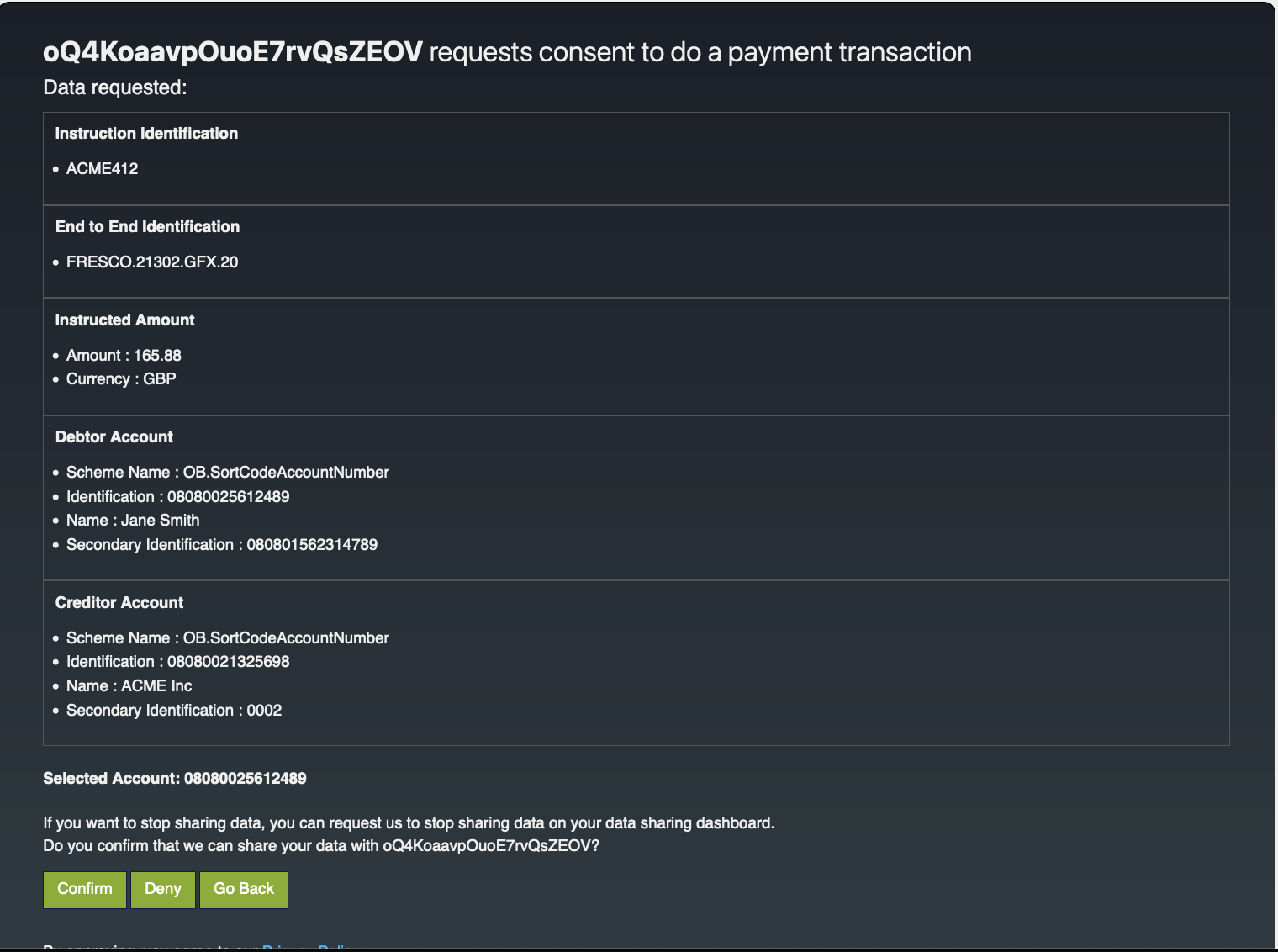
The page displays the payment details and the bank account details.
-
Click Confirm to grant these permissions.
-
Upon providing consent, an authorization code is generated on the web page of the
redirect_uri. See the sample given below:The authorization code from the below URL is in the code parameter (
code=236e635e-03c2-370b-b2c3-88eea5ac8981).https://www.google.com/redirects/redirect1#id_token=eyJraWQiOiJxR1NxMjZJZXpjbDhPdVNEVjg5SmlLQVlEdVkiLCJjdHkiOiJKV1QiLCJlbmMiOiJBMjU2R0NNIiwiYWxnIjoiUlNBLU9BRVAifQ.oP7_5P9HlbGrXpxByIvpjeCOfMml1tSQMYv_0Xahoj_8m5SNhqNMqteqZkVmHgso-uBnaZTtWZf9aow2CpLVGEMQLt1O9PazfCLj58EWxGvx0a94DAvsw8T_to0ZV_3WxGrmG0ve-KYEBTCXCIiWtP44wHpA5w-Q6tJunrTpZVL6HTkYzQoIO1cNBEwKB0llK4M15Zr1K15d9nmtfQsDY_dBZUvEsvddajdiDIbSjkvKo3_SKhwtYy_71YsnY6Yae0L56-XKBI8VO2_L8LVt8cMrN0B33QjAUnSKc5b4booLb3RJd7c_hHxRlH88xoTY46WOzvgKOkpEevwOjGKncw.4A9uNyCnZds7-ATT.vKbthTWg43nHD4IeNZK5r33vXQ5u1VnVnQ_qQUA5mJRhkHHyRHCtFNvAycDbmnZUK-g8nJKr3bCSWDrmXoVtXreyd5PPeaXJQouKWC3-mX1yjJ_6WTesGrT4ko0P_gy8Uspkot8acHwEblFJ5cbXyxqvRQqTjhbZW_UGGl_9c9PDIMtzoEOK_CpZZGXRJdJ4xCQzNHOZjUczvF2Q7JBm63yWyfoIqmAE29gPBOtmvoSgFjoQjLDV5aWhnDIBIxGGMZEa73ND-SiDtASr5Gy1RuNWgnKo9OGjMdsbgw3mQJhXv_5G9M3qBXxv5z9AgZUzOtK5o19uASJZyp2nbPO7v9HeRf3KV7eUjmeZGh2CL-WtjAN9KoDu_Ds49sNxP1zQ1ViauHY35dSZzY-8k_IOCcX_eQj3xT3IAw-kU1ziq4jOxTSbzXflsfFggXUbvVd-0eraPutSU8scrfk_tpGHE_9cJUNnB8S9nQCWV621PpGkmovg_WwGQJhnEmhxvwEwtUpF7aMphHWqgje43SKhlqQXW-D2xZ_x9xptL36leXzH-sRkqLjc2Eh68reun9222ehPR0zXP3kLCGYgS3Wb1Of7LlF8j9eUCmbosEJTP7QUb6mwxjmRac6nFl4IkzBqPFD-ErkW6JlRYU68x2vWuxpPOBbiuiNk7hUTd4Tdj9qGcby6Bd1bbsVKHcXxLZaI4O-ajuP9hx8Tt_ttJKh0Kw_7EEVjE20xv2fye-u-UnFyXjxOehbaMpOoYBByYwb7EVzHipPitKu5QwTf2IGIJa0NYvTNjavKEJKAUngh5AMP0HS8f_fsR0q1Cew3oB7lI-YCiiwkTQO9EA5GDTi6Na_e3YDnZ0FoYUOBhZZdMEjoCAA1bWRaZLsZY4iAzpmOX-4zwdTsyKxVlOqj3TTWGY9W7S29H6QoCcjHCJeaeILZzLtZub5qUgjYyQ9zfT5WyZRgsTgoWyS2o6yFBazx-aTmSY1DeNhQPwBYOdiG5z4xQXAshpogRJ95yFxDpSDHJbaJwaW4vJa86TquyE3-fgYXWcttRzqkpqUllVHvINa0oAh3j5tTKf3f4EdzqJE2BpgpHvjyq2_6B9WCbSdF5e5tnPXUVlpLA4RVFcv0RTC-NB33c0liBr9GDio0wPXIlw2by9mVSMnzivTHlQtwHOBvJBVhdXS4_s3Zsvx_2H-83ETqfbw8N55kTkSaEAVZsawbQjiWuKLPycgZ4K3R2o91B3spC_Et7NIzM9w4nTnOEcc2taUGObn6yA9ndoEcV6oob6fsFRr9fyrjcOdiza8whIJBjXe-oWCT-gI94x_0p5Zpbl4q9lVs_zSlQxRyEj-JDtovD-joggMUtq78F360Jgr1CLkpvcpOwzJet_fmEOY3nAWVE5Wo5RoVICaCLu0oQ19HO3zZFxx2JdeNnZJcD29WoTeT1zqkP2cJNAmNf0GlTF6Ac93sQF5YQEOle0etSK9JoefRWB91n_lkY8csi0VcJh7XnSHJs5CNsW9swpBAiF-gGzMgLoH0qSEODMbklQemKjnvOOHcqrTDbGlojSmAZxPOMxTsuOvKFL81xX1dPpZA8x3WpHR3jcz0EmdLvnhYYYFWE0o2w8lWiNfshBcrrGd7_M_1culRJyxlNYn4WbtTX6CQynfELZbFBGKc6ox4qYobyqI0PeINeOWxflK835uIAg5snTfdFDUTLe-7iRN1y64vyZGDe5-aXSvQ1NoOfZmDqxNBgRKAIBdr9L80TNM8jq_JGqDSOas8Z6mEyC18BoMwEu97nGw2LYjZw-p_7oCapCnUbCv72OtKNrTI2TdgpeUEdYNECJ4muBPb7Z8ICoHhOpiiPml2h2TJ1ZhfnNXPSCMgZuNYdEYPGE1KTXPU7YC27I7DYbTvFQ52Kb5P1MqurwPi2fPEsKyz_KI1M1MpUifi-EwUXX6ckS-Xf8UvG8xmHAom6vDKrFa_97w7rm-8ac4ap3iV2khXDkVeSTYuuYjRW6vM3MJH2FyiawvAIA6SDgnX.xqR42iH-8CVGBJXcFJ_rdA&code=236e635e-03c2-370b-b2c3-88eea5ac8981&session_state=9611f5bbb7b21fa6d3a3d7d7772c3fc13726e871538a736d828977ca799cec9a.-wKdwJbS4iE5lJezyOAuZg&state=caf63600-e38e-4a3f-a98a-ed930595a677
Step 4: Generate user access token
-
You can generate a user access token using the sample request given below:
curl -X POST \ https://localhost:9446/oauth2/token \ -H 'Cache-Control: no-cache' \ -H 'Content-Type: application/x-www-form-urlencoded' \ --cert <PUBLIC_KEY_FILE_PATH> --key <PRIVATE_KEY_FILE_PATH> \ -d 'grant_type=authorization_code&code=236e635e-03c2-370b-b2c3-88eea5ac8981&scope=openid%payments&client_assertion_type=urn:ietf:params:oauth:client-assertion-type:jwt-bearer&client_assertion=<CLIENT_ASSERTION>&redirect_uri=https://www.google.com/redirects/redirect1' -
The
client_assertionparameter is a JWT as explained in the Generating an application access token step. -
Update all parameters and use the authorization code you generated in the previous step as
code. -
The response contains a user access token as below.
{
    "access_token": "eyJ4NXQiOiJ2b05uSEROb3ZLMF9IclNxd1BsOEJBWkVxRlUiLCJraWQiOiJPR1ZqWTJOa1pqQTVObVJtTXpFME9HUTJPRE16TlRaaU5XVm1NV0UwTWpka1pUWXhOVGc1Tm1WaE1qYzNaRGd4WlRKaVlqWXpZMkk1WWpRMU5qRTRPQV9SUzI1NiIsInR5cCI6ImF0K2p3dCIsImFsZyI6IlJTMjU2In0.eyJzdWIiOiIxMmM5NTI3MC1iNDUxLTQ3OGQtYTMyOS02NTQ1MjM4OWQwZTRAY2FyYm9uLnN1cGVyIiwiYXV0IjoiQVBQTElDQVRJT05fVVNFUiIsImJpbmRpbmdfdHlwZSI6ImNlcnRpZmljYXRlIiwiaXNzIjoiaHR0cHM6XC9cL2xvY2FsaG9zdDo5NDQ2XC9vYXV0aDJcL3Rva2VuIiwiY2xpZW50X2lkIjoibmlJSFdNVUVtZk1NSFFrZ0lfVnVUSVh2UnpJYSIsImF1ZCI6Im5pSUhXTVVFbWZNTUhRa2dJX1Z1VElYdlJ6SWEiLCJuYmYiOjE3NTI4MTE3MTUsImF6cCI6Im5pSUhXTVVFbWZNTUhRa2dJX1Z1VElYdlJ6SWEiLCJvcmdfaWQiOiIxMDA4NGE4ZC0xMTNmLTQyMTEtYTBkNS1lZmUzNmIwODIyMTEiLCJzY29wZSI6Im9wZW5pZCBwYXltZW50cyIsImNuZiI6eyJ4NXQjUzI1NiI6IjJFZ29wSEY2Y2JiWHQ5NUk1OEU2OVZFV0JUWllnRmlyQlU5dWdkNkQ5REEifSwiZXhwIjoxNzUyODE1MzE1LCJvcmdfbmFtZSI6IlN1cGVyIiwiaWF0IjoxNzUyODExNzE1LCJiaW5kaW5nX3JlZiI6IjZiZGExYWUxNDgwOTk0MDQyNjllNjcyYTRjYmU4YmFlIiwianRpIjoiMTllNWZjMjQtYzk2Ny00YjM4LTg5MGItYTc1ZjRiZDE5ZTgyIiwiY29uc2VudF9pZCI6ImM0ZDE4ZDkyLWIxYTItNGE1Yy1iMWU0LWFiMzJkYWM5NzMxMiJ9.Ynnl3gtiodMAxkxQtgBH5QMLia6et-sTzmH3kpGsTpzmZxAZdTLo1MlBgZukr-7k9FnQMkwjR7zIvj3WhLEEzgpl3ZaVyJ-hkp9Y_6j5OPpYKJ7pvSoZlxUYMPrUa5JqQ36g8qolWJRm0FAJQdV5YoZBm5SCCJI2o9pspRFhuF5VTLXDBdnDJNoyvE8JgV9CTiw6-tRw_sFfr_IFtAgaAh2cSdHi4pKL9zD6-HPU82KtewvzEoRMb2boDcrmJDs8Vp02gsA0wIT4wvTdYfRuWIGVasFpK7t63d6I8MHWxfRoD1veMYFvclVO9GeY0bT53Bbi24LEYEMZ54uzFJuqlA",
    "refresh_token": "fbea8dee-5242-37f2-a862-4eb995d299df",
    "scope": "openid payments",
    "id_token": "eyJraWQiOiJxR1NxMjZJZXpjbDhPdVNEVjg5SmlLQVlEdVkiLCJjdHkiOiJKV1QiLCJlbmMiOiJBMjU2R0NNIiwiYWxnIjoiUlNBLU9BRVAifQ.mBITyfvmfNyj-vsSVurY7YrbEH7XJ4OyQqAA13L7HkjXs04pO9_W9Yz1195AgJKvSnAkUEbl6b9jyXuigCMN29YWubbO6UmC2Ny99G1w6XCURtFUAO3EG3jPjsQUE3xFkHhGL3kLoO10TFxDFYJslSjZKdU13EuIC4kZKfcecFOSD0r-6bwab1tqjU_eNKSaPF8ZJPU231d7DUX1ONZ-lZNz1p-2VQl-qGPRth5RCK6djlWTD2OwQJIWfjpqPo3Qg_2zE05plaI1Eovas1tg5QEGkhoGW1-ssDmMzujzQHBcQ4PmRNi_I7DNVCIxjWO3ipSH__v0XgEP487dGxjg7w.HjqFsWjNNupQIkJR.O_qR9EwFYp_pWYN_ytg1_9vF_ixoWhH5hQ8eLJrZaoq03Y7f_3DCq0PmVoae1ihzs5KsNqDkYqTvqM3IhseBzNSxSlYnAT2UF2IoX6ExqNFmbOayDX-yRtZ3XA_sha4gJl-CIWTun6isA3h3Op2cRNfPrZNjazuOlm351Fi4BJtquvNr_lQHMfT3FRUIgEOL1Mwok-JFXBP_dD1-9WNDj_Hn8QIhR56XlrwJJ5OV5ezFzeLTAuWOMkjF7JMmEolWOflh0d9owxTpRg42TIBBbC4DuLJkyJFx8-2qMPioOx6jJIxbA9SEXthA5ha8VkhXqh8jrIxFn5tCOLGIxAtW9HpDWbPWrP_T1FL1Rp4W3i5AKKKNgzuz9hIeUDkua67FslVXqDgaesqu6f2YTbUpYyos0XU4bFFFu_7SPo1ULCeYJuC7G2yBDgG24QOsfs7hgQXwiEnoFEHGy-_0zOSD-dhk0_ikj8WzFKIDTtoC_2KPvEka4eeeHkBimxQj1qbg2PLPObKER5Op0k4FVFzSJcxFcv_9ITYdm9v9msSsf1yj8Tok54oJ9LUzxNdSV43Cq-j4mij9HMdHY7M3FzRfS8DaKVrvOXDS2UEYRuwu5xvEndx2AuRUdXFQJddaI_BnSrKy3IIxQqY8gmRiB8Si1EJRLFI49B5Qt3QGFrNRQEZc87xboIHCtcOYB_YBng5HSXrAgwdlm2nvI8ZHKM25IQc1bbnvUx7JMOyNpWBooT2N6wtTeAX7qJFi8a-_3GJlArjVFok0qCRlyFAz1oHGZSJceFH27c9gd5BUMm_QVufqI-0Cv_ayor2YaybFEkGIBvx5SUJCYrrihQZZIVI2tqIx4neJ13JZ9LfS2wMA66H9CasijbD7XvTKA438a__sY841Wi9WiKuTAkk2b1ix6kvlkzphMQC9b48pAWPqADhOQQK0ksnnHFVff0uyn6WzrjkWruUHnlncNRNPw_GXqfuwD4OFcGhKzGqJUDb5LVjwg_DL30he3WTrTD_BLuI_8D4Qsjw_KwczXcSvYhECffnv07FHP1-wYyHDXL3fU3o5AfqLFQO2Ps2Lj5bAUzbPzrswsJmdeh48sGdPXeysbHyd9QPMtbk2qq0NBcj6Qd2WsffL6Wu7AktVpl2BHJPtYvLIQOkb1gc2Y7UHG2W3KMYeXqHdDz0oiBRrhIUBMLT61VN-tx04kWxcHvPB90Evdb5GwOoQ7-PO1Q_sbRiyVX1oG79edV2RQWJjYNgZV5iodOxQ0xjfyMEltDyZ2srQ0QEGhA1flT98Fd18ypWDnwEDd-TKjL0h05YBey9PEVhtPkY5E7aC_0LyKDmOFewJ-C0buHobbjB6BsQOcfkQxgJYyJVMjOh7U0pbLfze9-uF-36G7keQ_m5jKgy0lRd7EKJO-Rzj84ydJ6xIKXyYwiSysPa52_ZIopxMAq8gXjovxIOIoLMZvBWI1QXeoneYQdT410R5uQO_hQuMkncm2AHtobFUoN1JMY2FyhMBT8qze8RAei3-ROBoLIHpVmFTA45JKXKqK5KSvNgKo_-6zschb3pWv2hy_2P6npLfcl96OiTg6pqtnWqs6K_fPKno_2HihGeq4_RyNj6I5r2-gsYXSbaFkxzDZpf_d2gl-0K1okwzV_dbC721ZblpruwldL0IOUXBAoN1BMArEYQxqv-Pb1_XTt9y7w384UsA7mDyic9U0MF2iB3ToIUswzEPFXfF7O6jbMZKJDBCFVwWQgnEdt2zlYQY6P_EnCxOrRysOdRf221uiO49ELxSuvjckf4.3MwhksykaKnelKEKY1xd9Q",
    "token_type": "Bearer",
    "expires_in": 3600
}
Step 5: Invoking Payment Submission API
Once the user approves the payment consent, the TPP can proceed to submit the payment order for processing. The following request is an instruction to the bank to begin the process of creating a payment resource.
The TPP must ensure that the Initiation and Risk sections of payment match the corresponding Initiation and Risk sections of the payment-consent resource. If the two do not match, the bank must not process.
-
A sample request looks as follows:
curl -X POST \ https://localhost:8243/open-banking/v3.1/pisp/payments \ -H 'x-fapi-financial-id: open-bank' \ -H 'Authorization: Bearer <AUTH_HEADER_VALUE>' \ -H 'Accept: application/json' \ -H 'Content-Type: application/json; charset=UTF-8' \ -H 'x-idempotency-key: 249667' \ --cert <TRANSPORT_PUBLIC_KEY_FILE_PATH> --key <TRANSPORT_PRIVATE_KEY_FILE_PATH> \ --data '{ "Data": { "ConsentId": "58991daf-c481-49b2-8917-3cab9233fe58", "Initiation": { "InstructionIdentification": "ACME412", "EndToEndIdentification": "FRESCO.21302.GFX.20", "LocalInstrument": "OB.Paym", "InstructedAmount": { "Amount": "165.88", "Currency": "GBP" }, "CreditorAccount": { "SchemeName": "OB.SortCodeAccountNumber", "Identification": "08080021325698", "Name": "ACME Inc", "SecondaryIdentification": "0002" }, "DebtorAccount": { "SchemeName": "OB.SortCodeAccountNumber", "Identification": "08080025612489", "Name": "Jane Smith", "SecondaryIdentification": "080801562314789" }, "SupplementaryData": { "additionalProp1": { } } } }, "Risk": { } }' -
The request submits the payment details to the bank. Given below is a sample response:
{
    "Meta": {

    },
    "Links": {
        "Self": "/payments/58991daf-c481-49b2-8917-3cab9233fe58-25"
    },
    "Data": {
        "Status": "AcceptedSettlementCompleted",
        "StatusUpdateDateTime": "2025-07-18T09:38:36+05:30",
        "CreationDateTime": "2025-07-18T09:38:36+05:30",
        "PaymentId": "58991daf-c481-49b2-8917-3cab9233fe58-25",
        "ConsentId": "58991daf-c481-49b2-8917-3cab9233fe58",
        "Initiation": {
            "SupplementaryData": {
                "additionalProp1": {

                }
            },
            "LocalInstrument": "OB.Paym",
            "DebtorAccount": {
                "SecondaryIdentification": "080801562314789",
                "SchemeName": "OB.SortCodeAccountNumber",
                "Identification": "08080025612489",
                "Name": "Jane Smith"
            },
            "EndToEndIdentification": "FRESCO.21302.GFX.20",
            "InstructionIdentification": "ACME412",
            "CreditorAccount": {
                "SecondaryIdentification": "0002",
                "SchemeName": "OB.SortCodeAccountNumber",
                "Identification": "08080021325698",
                "Name": "ACME Inc"
            },
            "InstructedAmount": {
                "Amount": "165.88",
                "Currency": "GBP"
            }
        }
    }
}
With UK JWS Header Processing Policy
Just like Step 2, if you have enabled the UK JWS Header Processing Policy, this request must be signed with a Detached JWS using your TPP Private Key.
curl -X POST \
https://localhost:8243/open-banking/v3.1/pisp/payments \
-H 'x-fapi-financial-id: open-bank' \
-H 'Authorization: Bearer <AUTH_HEADER_VALUE>' \
-H 'Accept: application/json' \
-H 'Content-Type: application/json; charset=UTF-8' \
-H 'x-idempotency-key: 249667' \
-H 'x-jws-signature: <JWS_SIGNATURE>' \
--cert <TRANSPORT_PUBLIC_KEY_FILE_PATH> --key <TRANSPORT_PRIVATE_KEY_FILE_PATH> \
--data '<REQUEST_PAYLOAD>'x-jws-signature: A detached JWS signature of the request body signed with your TPP private key.
With JWE Payload Processing Policy
Just like Step 2, if you have enabled the JWE Payload Processing Policy, this request payload must be encrypted as a JWE compact serialization.
curl -X POST \
https://localhost:8243/open-banking/v3.1/pisp/payments \
-H 'x-fapi-financial-id: open-bank' \
-H 'Authorization: Bearer <AUTH_HEADER_VALUE>' \
-H 'Accept: application/json' \
-H 'Content-Type: application/jose+jwe' \
-H 'x-idempotency-key: 249667' \
--cert <TRANSPORT_PUBLIC_KEY_FILE_PATH> --key <TRANSPORT_PRIVATE_KEY_FILE_PATH> \
--data '<JWE_ENCRYPTED_PAYLOAD>'Content-Type: Must be set toapplication/jose+jweto trigger the JWE decryption mediator.<JWE_ENCRYPTED_PAYLOAD>: The request body encrypted as a JWE compact serialization using the server's public certificate.