Consent Authorize Endpoint
The Consent Authorize Endpoint is responsible for loading the consent approval page and persisting the consent provided by users. It provides two main operations: retrieving consent information to display on the approval page and persisting the user's consent decision.
WSO2 Open Banking Accelerator provides extension points to customize these components according to your requirements.
Retrieve Consent Information
The retrieve endpoint fetches consent details to display on the approval page. You can extend the jsonObject sent to the consent page using the Retrieval Steps extension. This is useful for:
- Customizing data displayed on the consent page
- Meeting data reporting requirements
- Adding specification-specific information
Note
The information sent and displayed on the consent page depends on the Open Banking specification you are implementing.

Sample Request:
curl -X GET \
https://<IS_HOSTNAME>:9446/api/fs/consent/authorize/retrieve/<SESSION_DATA_KEY> \
 -H 'Accept: application/json' \
 -H 'Authorization: Basic <AUTH_HEADER_VALUE>'
Sample Response:
 {
  "consentData" : {
    "permissions" : [ {
      "uid" : "3c42210b-5eb8-40e2-a712-5c759a1773ef",
      "displayValues" : [ "ReadAccountsBasic", "ReadAccountsDetail", "ReadBalances", "ReadTransactionsDetail" ]
    } ],
    "allowMultipleAccounts" : true,
    "type" : "accounts",
    "basicConsentData" : {
      "Transaction From Date Time" : [ "2026-04-16T11:36:10.955194+05:30" ],
      "Transaction To Date Time" : [ "2026-04-19T11:36:10.955271+05:30" ],
      "Expiration Date Time" : [ "2026-04-21T11:36:10.954581+05:30" ]
    }
  },
  "application" : "oQ4KoaavpOuoE7rvQsZEOV",
  "consumerData" : {
    "accounts" : [ {
      "accountId" : "30080012343456",
      "displayName" : "Salary Saver Account",
      "selected" : false
    }, {
      "accountId" : "30080098763459",
      "displayName" : "Max Bonus Account",
      "selected" : false
    } ]
  },
  "type" : "accounts"
}
Persist Consent Decision
The persist endpoint handles the user's consent approval or denial. When the consent page invokes the /persist endpoint, the Persistent Steps are engaged to process and store the consent decision along with the associated data.
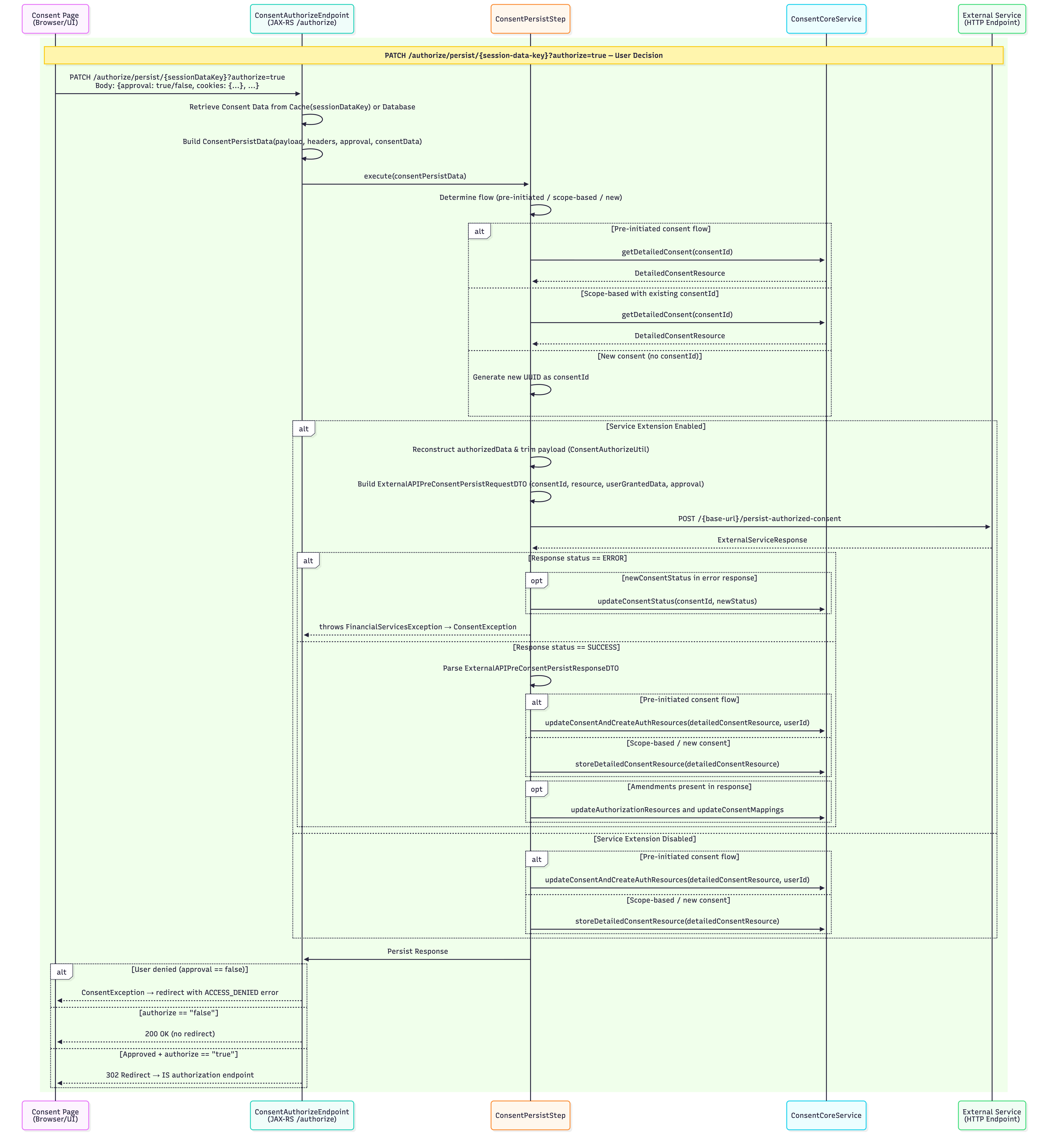
Sample Request:
curl -X PATCH \
  'https://<IS_HOSTNAME>:9446/api/fs/consent/authorize/persist/<SESSION_DATA_KEY>' \
  -H 'Authorization: Basic <AUTH_HEADER_VALUE>' \
  -H 'Content-Type: application/json' \
  --data '{
    "metadata": {},
    "approval": "true",
    "requestParameters": {
      "hasApprovedAlways": ["false"],
      "6ae75f7a-3124-4841-a783-2e065418e2fe": ["Salary Saver Account"],
      "consent": ["true"],
      "type": ["accounts"],
      "sessionDataKeyConsent": ["d53e3f9a-29f6-4fee-93a4-6d27118f17a5"]
    },
    "type": "accounts",
    "cookies": {
      "commonAuthId": "d040bf2e-c5e0-4d12-b3f3-e88cd033be83",
      "JSESSIONID": "4E7AD53A66B6F0B87B5B7446F8BAC3E0D98C65048E273EEB71E9DD90BEBECB7C1E253E6EACF1CA4039D77AE2117CB3B2C49D468FDF2F88E06D757911465B6FC2A0095A5E86B0D4460030CEA75B4E75FA6D091599383D6EEBE2C36BCD81099B17ED492CCDE1E86F244907598D5CE3C82DFF616DB5D750A16F0E2BA1E99638505A",
      "ui_lang": "en_US"
    }
  }'
Sample Response:
The persist endpoint responds with a 302 Redirect with the following Location header:
Location: https://www.google.com/redirects/redirect1#id_token=eyJraWQiOiJxR1NxMjZJZXpjbDhPdVNEVjg5SmlLQVlEdVkiLCJjdHkiOiJKV1QiLCJlbmMiOiJBMjU2R0NNIiwiYWxnIjoiUlNBLU9BRVAifQ...&code=c4cffad8-f67b-3bd0-b911-1decc073243f&session_state=7515fc1b4d9c9a251df6aacac2863f015fc206765552bcfda6ff0c913923ad66.awV7EVsj6zpBDJId1sXI1Q&state=94a33f31-b50a-4793-b20f-a282b7599880Required Parameter
The approval parameter is mandatory in the request payload. It is a boolean value that specifies whether the customer has authorized the consent.
Customization
OpenAPI-Based Extensions
WSO2 Open Banking IAM Accelerator 4.0.0 onwards supports OpenAPI-based extensions for consent management customizations. For more information, see Open API Based Extensions for Consent Authorize Endpoints.
Consent Grant Screen Customization
The Populate Consent Authorization Screen extension provides flexibility to customize the consent grant screen according to Open Banking specification UX guidelines. Based on the response payload returned by this extension, the Accelerator dynamically adjusts the layout of the consent grant screen.
For detailed information, refer to Customizing Consent Grant Screen
Top