Consent Manage Endpoint
The Consent Manage Endpoint (/manage) provides REST APIs to create, retrieve, update, and delete consent resources. These endpoints serve as backend services for the consent endpoints defined in the Open Banking specification.
WSO2 Open Banking Accelerator provides extension points to customize these components according to your requirements.
Overview
This section demonstrates how to use the /manage endpoint for:
- Creating new consents
- Retrieving consent details
- Updating existing consents
- Revoking consents
- Uploading and retrieving files for file-based consents
Click here for Prerequisites
Before you try out the consent flow, ensure you have completed the following:
- Configure API Resources, Users, and Roles
- Assign roles to the user
- Register an application for the API consumer
- Replace
<AUTH_HEADER_VALUE>with Base64 encodedadmin_username:admin_passwordvalue
Example:Base64(admin_username:admin_password) - Transport certificates are available here
Consent Manage Creation
Create a request to obtain the customer's consent to access their bank accounts and related information.
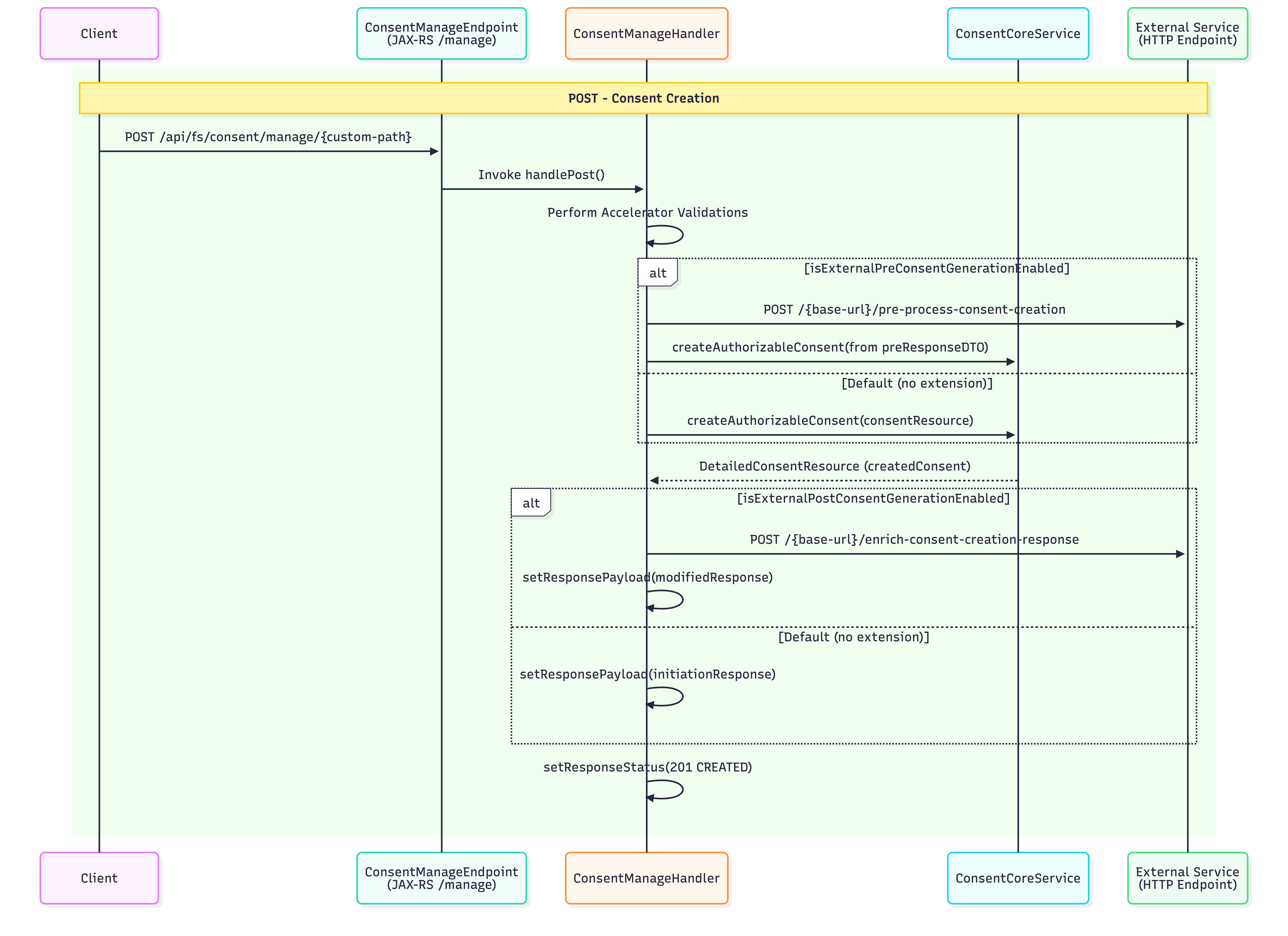
Sample Request:
curl -X POST \
  'https://<IS_HOSTNAME>:9446/api/fs/consent/manage/account-access-consents' \
  -H 'Authorization: Basic <AUTH_HEADER_VALUE>' \
  -H 'x-wso2-client-id: <CLIENT_ID>' \
  -H 'Content-Type: application/json' \
  -H 'x-fapi-interaction-id: <INTERACTION_ID>' \
  --cert <TRANSPORT_PUBLIC_KEY_FILE_PATH> --key <TRANSPORT_PRIVATE_KEY_FILE_PATH> \
  --data '{
    "Data": {
      "TransactionToDateTime": "2026-03-19T13:46:07.270659+05:30",
      "ExpirationDateTime": "2026-03-21T13:46:07.269894+05:30",
      "Permissions": [
        "ReadAccountsBasic",
        "ReadAccountsDetail",
        "ReadBalances",
        "ReadTransactionsDetail"
      ],
      "TransactionFromDateTime": "2026-03-16T13:46:07.270580+05:30"
    },
    "Risk": {}
  }'
Sample Response:
The response contains a Consent ID:
{
  "Data": {
    "StatusUpdateDateTime": "2026-03-16T13:46:08+05:30",
    "Status": "AwaitingAuthorisation",
    "CreationDateTime": "2026-03-16T13:46:08+05:30",
    "TransactionToDateTime": "2026-03-19T13:46:07.270659+05:30",
    "ExpirationDateTime": "2026-03-21T13:46:07.269894+05:30",
    "Permissions": [
      "ReadAccountsBasic",
      "ReadAccountsDetail",
      "ReadBalances",
      "ReadTransactionsDetail"
    ],
    "ConsentId": "328524c0-b4a3-457e-a145-e79d92c4654e",
    "TransactionFromDateTime": "2026-03-16T13:46:07.270580+05:30"
  },
  "Risk": {}
}
Consent Manage Retrieve
Use the Consent Retrieval endpoint to retrieve a consent resource and check its status.
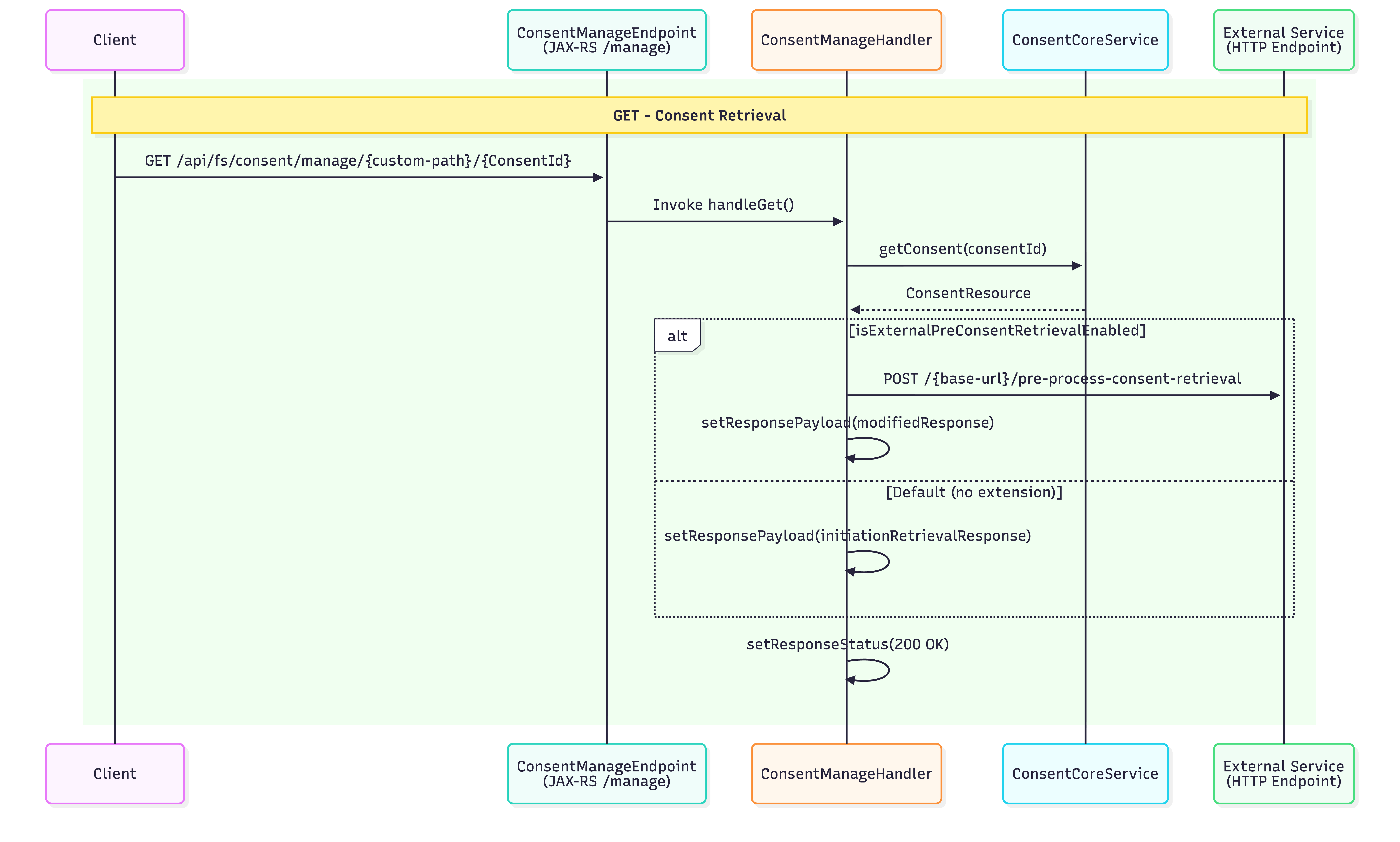
Sample Request:
curl -X GET \
  https://<IS_HOSTNAME>:9446/api/fs/consent/manage/account-access-consents/<CONSENT_ID> \
  -H 'Authorization: Basic <AUTH_HEADER_VALUE>' \
  -H 'x-wso2-client-id: <CLIENT_ID>' \
  -H 'x-fapi-interaction-id: <INTERACTION_ID>' \
  -H 'Accept: application/json' \
  -H 'charset: UTF-8' \
  -H 'Content-Type: application/json; charset=UTF-8' \
  --cert <PUBLIC_KEY_FILE_PATH> --key <PRIVATE_KEY_FILE_PATH>
Sample Response:
{
  "Data": {
    "StatusUpdateDateTime": "2026-03-16T13:46:08+05:30",
    "Status": "AwaitingAuthorisation",
    "CreationDateTime": "2026-03-16T13:46:08+05:30",
    "TransactionToDateTime": "2026-03-19T13:46:07.270659+05:30",
    "ExpirationDateTime": "2026-03-21T13:46:07.269894+05:30",
    "Permissions": [
      "ReadAccountsBasic",
      "ReadAccountsDetail",
      "ReadBalances",
      "ReadTransactionsDetail"
    ],
    "ConsentId": "328524c0-b4a3-457e-a145-e79d92c4654e",
    "TransactionFromDateTime": "2026-03-16T13:46:07.270580+05:30"
  },
  "Risk": {}
}
Consent Manage Internal Detail Retrieve
WSO2 Accelerator provides an internal consent-retrieval endpoint to retrieve details of a consent resource and check its authorizations. This endpoint can be invoked only by banks using the x-wso2-internal-request header.
Sample Request:
curl -X GET \
  https://<IS_HOSTNAME>:9446/api/fs/consent/manage/account-access-consents/<CONSENT_ID> \
  -H 'Authorization: Basic <AUTH_HEADER_VALUE>' \
  -H 'x-wso2-internal-request: true' \
  -H 'x-wso2-client-id: <CLIENT_ID>' \
  -H 'x-fapi-interaction-id: <INTERACTION_ID>' \
  -H 'Accept: application/json' \
  -H 'charset: UTF-8' \
  -H 'Content-Type: application/json; charset=UTF-8' \
  --cert <PUBLIC_KEY_FILE_PATH> --key <PRIVATE_KEY_FILE_PATH>
Sample Response:
{
  "validityPeriod": 1774080967,
  "consentAttributes": {},
  "updatedTime": 1773648968,
  "consentID": "328524c0-b4a3-457e-a145-e79d92c4654e",
  "clientID": "7bw8O8_7_E7s2Y6reXupdwXqGm4a",
  "consentType": "accounts",
  "createdTime": 1773648968,
  "recurringIndicator": false,
  "receipt": "{\"Data\": {\"Permissions\": [\"ReadAccountsBasic\", \"ReadAccountsDetail\", \"ReadBalances\", \"ReadTransactionsDetail\"], \"ExpirationDateTime\": \"2026-03-21T13:46:07.269894+05:30\", \"TransactionToDateTime\": \"2026-03-19T13:46:07.270659+05:30\", \"TransactionFromDateTime\": \"2026-03-16T13:46:07.270580+05:30\"}, \"Risk\": {}}",
  "authorizationResources": [
    {
      "authorizationID": "7b77e19b-e588-49b9-a4fb-937c66f589ce",
      "authorizationType": "authorisation",
      "resources": [],
      "authorizationStatus": "Created"
    }
  ],
  "consentFrequency": 0,
  "status": "AwaitingAuthorisation"
}
Consent Update
The bank can update customer consent using this internal endpoint. This endpoint can only be invoked by banks with the x-wso2-internal-request header.
Sample Request:
curl -X PUT \
  https://<IS_HOSTNAME>:9446/api/fs/consent/manage/account-access-consents/<CONSENT_ID> \
  -H 'Authorization: Basic <AUTH_HEADER_VALUE>' \
  -H 'x-wso2-client-id: <CLIENT_ID>' \
  -H 'x-wso2-internal-request: true' \
  -H 'x-fapi-interaction-id: <INTERACTION_ID>' \
  -H 'Content-Type: application/json' \
  --cert <TRANSPORT_PUBLIC_KEY_FILE_PATH> --key <TRANSPORT_PRIVATE_KEY_FILE_PATH> \
  --data '{
    "consentID": "328524c0-b4a3-457e-a145-e79d92c4654e",
    "status": "Authorised",
    "validityPeriod": 1774080967,
    "recurringIndicator": true,
    "consentFrequency": 0,
    "receipt": "{\"Data\": {\"Permissions\": [\"ReadAccountsBasic\",\"ReadAccountsDetail\",\"ReadBalances\"],\"ExpirationDateTime\": \"2026-03-17T15:43:35.946770+05:30\",\"TransactionFromDateTime\": \"2026-03-12T15:43:35.947399+05:30\",\"TransactionToDateTime\": \"2026-03-15T15:43:35.947514+05:30\"},\"Risk\": {}}",
    "consentAttributes": {
      "key1": "value1",
      "key2": "value2"
    },
    "authorizationResources": [
      {
        "userID": "[email protected]",
        "authorizationType": "auth",
        "authorizationStatus": "Created",
        "resources": [
          {
            "accountID": "1962368",
            "permission": "account",
            "mappingStatus": "active"
          }
        ]
      }
    ]
  }'
Sample Response:
{
  "validityPeriod": 1774080967,
  "consentAttributes": {
    "key1": "value1",
    "key2": "value2"
  },
  "updatedTime": 1773648968,
  "consentID": "328524c0-b4a3-457e-a145-e79d92c4654e",
  "clientID": "7bw8O8_7_E7s2Y6reXupdwXqGm4a",
  "consentType": "accounts",
  "createdTime": 1773648968,
  "recurringIndicator": true,
  "receipt": "{\"Data\": {\"Permissions\": [\"ReadAccountsBasic\", \"ReadAccountsDetail\", \"ReadBalances\"], \"ExpirationDateTime\": \"2026-03-17T15:43:35.946770+05:30\", \"TransactionToDateTime\": \"2026-03-15T15:43:35.947514+05:30\", \"TransactionFromDateTime\": \"2026-03-12T15:43:35.947399+05:30\"}, \"Risk\": {}}",
  "authorizationResources": [
    {
      "authorizationID": "f562ce1f-7afc-4b6f-ac9d-2c3b1b5633d3",
      "authorizationType": "auth",
      "resources": [
        {
          "mappingStatus": "active",
          "mappingID": "eeb76808-ce1c-4cdb-b161-b5b370c5827e",
          "accountID": "1962368",
          "permission": "account"
        }
      ],
      "authorizationStatus": "Created",
      "userID": "[email protected]"
    }
  ],
  "consentFrequency": 0,
  "status": "Authorised"
}
Partial Consent Updates
The consent update endpoint supports partial updates to existing consents.
Scenario 1: Update Consent Status
Sample Request:
curl -X PUT \
  https://<IS_HOSTNAME>:9446/api/fs/consent/manage/account-access-consents/<CONSENT_ID> \
  -H 'Authorization: Basic <AUTH_HEADER_VALUE>' \
  -H 'x-wso2-client-id: <CLIENT_ID>' \
  -H 'x-wso2-internal-request: true' \
  -H 'x-fapi-interaction-id: <INTERACTION_ID>' \
  -H 'Content-Type: application/json' \
  --cert <TRANSPORT_PUBLIC_KEY_FILE_PATH> --key <TRANSPORT_PRIVATE_KEY_FILE_PATH> \
  --data '{
    "consentID": "328524c0-b4a3-457e-a145-e79d92c4654e",
    "status": "Authorised"
  }'
Sample Response:
{
  "validityPeriod": 1774080967,
  "consentAttributes": {
    "key1": "value1",
    "key2": "value2"
  },
  "updatedTime": 1773648968,
  "consentID": "328524c0-b4a3-457e-a145-e79d92c4654e",
  "clientID": "7bw8O8_7_E7s2Y6reXupdwXqGm4a",
  "consentType": "accounts",
  "createdTime": 1773648968,
  "recurringIndicator": true,
  "receipt": "{\"Data\": {\"Permissions\": [\"ReadAccountsBasic\", \"ReadAccountsDetail\", \"ReadBalances\"], \"ExpirationDateTime\": \"2026-03-17T15:43:35.946770+05:30\", \"TransactionToDateTime\": \"2026-03-15T15:43:35.947514+05:30\", \"TransactionFromDateTime\": \"2026-03-12T15:43:35.947399+05:30\"}, \"Risk\": {}}",
  "authorizationResources": [
    {
      "authorizationID": "f562ce1f-7afc-4b6f-ac9d-2c3b1b5633d3",
      "authorizationType": "auth",
      "resources": [
        {
          "mappingStatus": "active",
          "mappingID": "eeb76808-ce1c-4cdb-b161-b5b370c5827e",
          "accountID": "1962368",
          "permission": "account"
        }
      ],
      "authorizationStatus": "Created",
      "userID": "[email protected]"
    }
  ],
  "consentFrequency": 0,
  "status": "Authorised"
}
Scenario 2: Update Consent Validity Period
Sample Request:
curl -X PUT \
  https://<IS_HOSTNAME>:9446/api/fs/consent/manage/account-access-consents/<CONSENT_ID> \
  -H 'Authorization: Basic <AUTH_HEADER_VALUE>' \
  -H 'x-wso2-client-id: <CLIENT_ID>' \
  -H 'x-wso2-internal-request: true' \
  -H 'x-fapi-interaction-id: <INTERACTION_ID>' \
  -H 'Content-Type: application/json' \
  --cert <TRANSPORT_PUBLIC_KEY_FILE_PATH> --key <TRANSPORT_PRIVATE_KEY_FILE_PATH> \
  --data '{
    "consentID": "328524c0-b4a3-457e-a145-e79d92c4654e",
    "validityPeriod": 1774080967
  }'
Sample Response:
{
  "validityPeriod": 1774080967,
  "consentAttributes": {
    "key1": "value1",
    "key2": "value2"
  },
  "updatedTime": 1773648968,
  "consentID": "328524c0-b4a3-457e-a145-e79d92c4654e",
  "clientID": "7bw8O8_7_E7s2Y6reXupdwXqGm4a",
  "consentType": "accounts",
  "createdTime": 1773648968,
  "recurringIndicator": true,
  "receipt": "{\"Data\": {\"Permissions\": [\"ReadAccountsBasic\", \"ReadAccountsDetail\", \"ReadBalances\"], \"ExpirationDateTime\": \"2026-03-17T15:43:35.946770+05:30\", \"TransactionToDateTime\": \"2026-03-15T15:43:35.947514+05:30\", \"TransactionFromDateTime\": \"2026-03-12T15:43:35.947399+05:30\"}, \"Risk\": {}}",
  "authorizationResources": [
    {
      "authorizationID": "f562ce1f-7afc-4b6f-ac9d-2c3b1b5633d3",
      "authorizationType": "auth",
      "resources": [
        {
          "mappingStatus": "active",
          "mappingID": "eeb76808-ce1c-4cdb-b161-b5b370c5827e",
          "accountID": "1962368",
          "permission": "account"
        }
      ],
      "authorizationStatus": "Created",
      "userID": "[email protected]"
    }
  ],
  "consentFrequency": 0,
  "status": "Authorised"
}
Update Behavior
- The consent update request ignores unavailable or null values. For example, if the
frequencyfield is not available or is null in the update payload, the existing value is not updated. - For
consentAttributesandauthorizationResources:- If non-empty: The system deletes existing data and stores the data from the update request payload.
- If empty: The system deletes the existing data.
- If not available or null: The existing value is not updated.
Consent Revocation
If the customer revokes consent to data access, make a request to delete the consent resource.
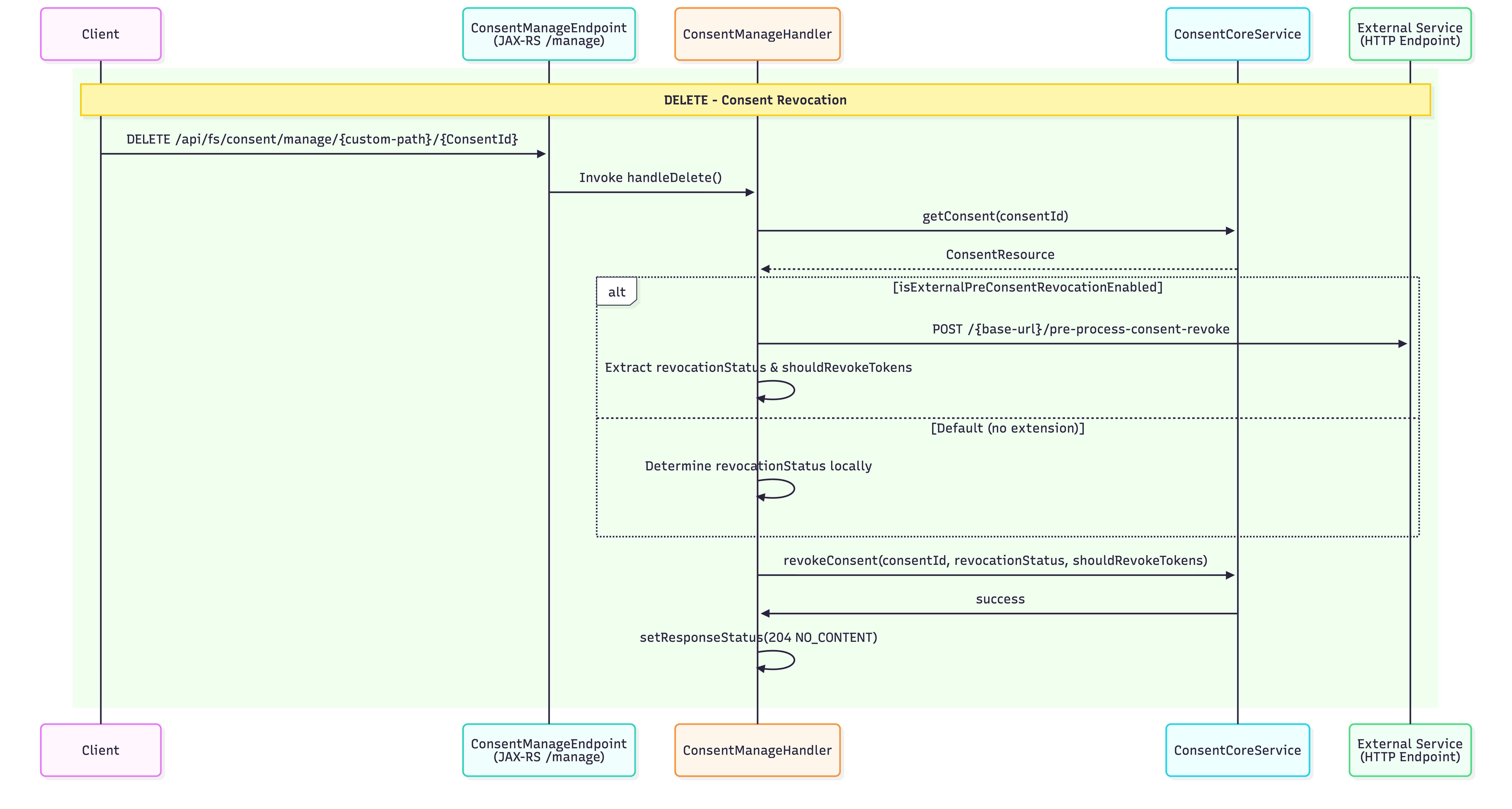
Sample Request:
curl -X DELETE \
  https://<IS_HOSTNAME>:9446/api/fs/consent/manage/account-access-consents/<CONSENT_ID> \
  -H 'Authorization: Basic <AUTH_HEADER_VALUE>' \
  -H 'x-wso2-client-id: <CLIENT_ID>' \
  -H 'x-fapi-interaction-id: <INTERACTION_ID>' \
  -H 'Accept: application/json' \
  -H 'charset: UTF-8' \
  -H 'Content-Type: application/json; charset=UTF-8' \
  --cert <PUBLIC_KEY_FILE_PATH> --key <PRIVATE_KEY_FILE_PATH>
Sample Response:
If the deletion is successful, you will receive a 204 No Content response.
Consent File Upload
WSO2 Open Banking Accelerator supports uploading files for consent. Before uploading a file, banks must create a consent using the consent creation endpoint and then use this endpoint to upload files for that consent.
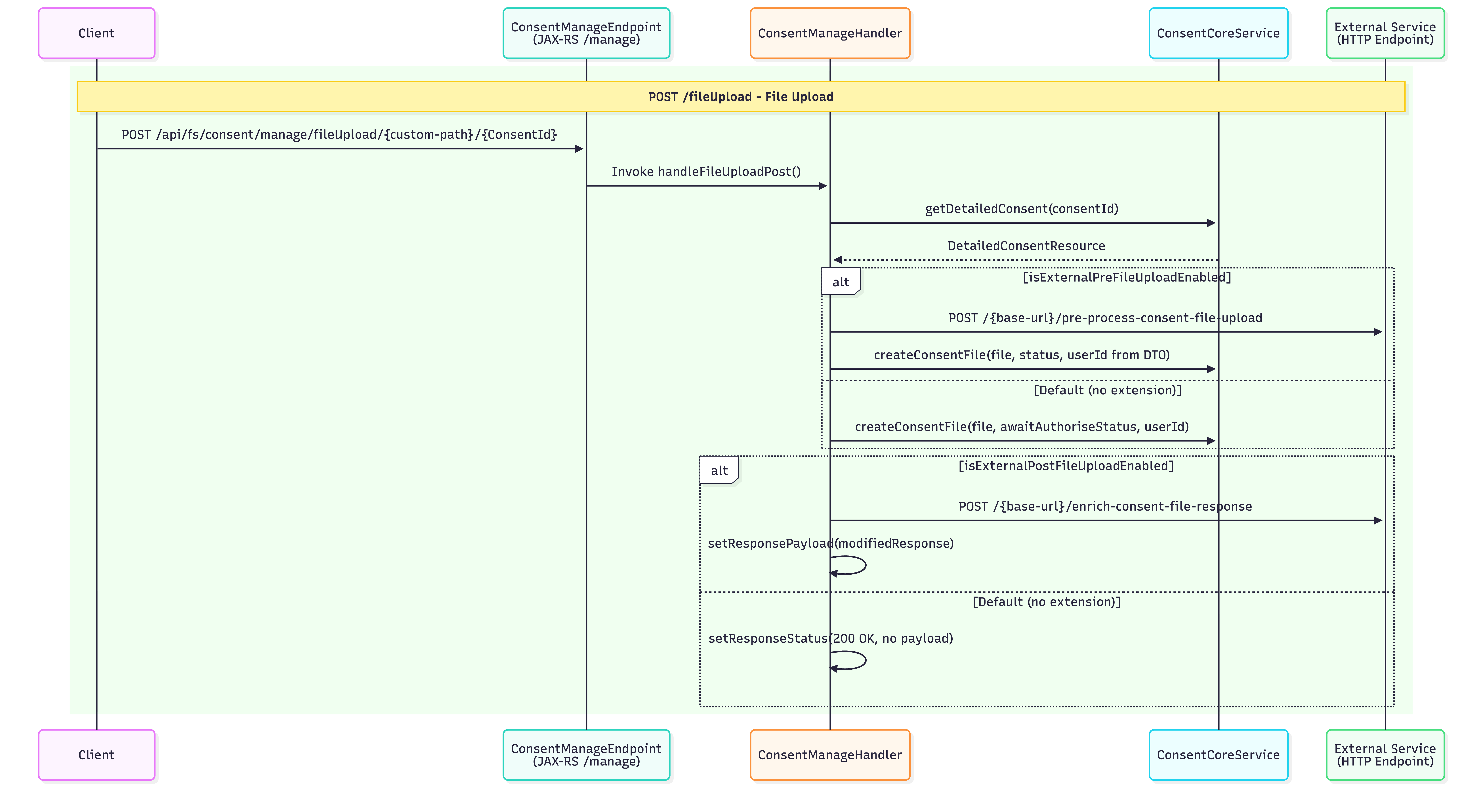
Sample Request:
curl --location 'https://localhost:9446/api/fs/consent/manage/fileUpload/file-payment-consents/<CONSENT_ID>' \
  -H 'x-wso2-client-id: <CLIENT_ID>' \
  -H 'Content-Type: application/xml' \
  -H 'Authorization: Basic <AUTH_HEADER_VALUE>' \
  -H 'x-fapi-interaction-id: <INTERACTION_ID>' \
  --cert <TRANSPORT_PUBLIC_KEY_FILE_PATH> --key <TRANSPORT_PRIVATE_KEY_FILE_PATH> \
  --data '<Document xmlns="urn:iso:std:iso:20022:tech:xsd:pain.001.001.08" xmlns:xsi="http://www.w3.org/2001/XMLSchema-instance">
  <CstmrCdtTrfInitn>
    <GrpHdr>
      <MsgId>ABC/120928/CCT001</MsgId>
      <CreDtTm>2012-09-28T14:07:00</CreDtTm>
      <NbOfTxs>2</NbOfTxs>
      <CtrlSum>70</CtrlSum>
      <InitgPty>
        <Nm>ABC Corporation</Nm>
        <PstlAdr>
          <StrtNm>Times Square</StrtNm>
          <BldgNb>7</BldgNb>
          <PstCd>NY 10036</PstCd>
          <TwnNm>New York</TwnNm>
          <Ctry>US</Ctry>
        </PstlAdr>
      </InitgPty>
    </GrpHdr>
    <PmtInf>
      <PmtInfId>ABC/086</PmtInfId>
      <PmtMtd>TRF</PmtMtd>
      <BtchBookg>false</BtchBookg>
      <ReqdExctnDt>
        <Dt>2026-10-01</Dt>
      </ReqdExctnDt>
      <PmtTpInf>
        <LclInstrm>UK.OBIE.BAC</LclInstrm>
      </PmtTpInf>
      <Dbtr>
        <Nm>ABC Corporation</Nm>
        <PstlAdr>
          <StrtNm>Times Square</StrtNm>
          <BldgNb>7</BldgNb>
          <PstCd>NY 10036</PstCd>
          <TwnNm>New York</TwnNm>
          <Ctry>US</Ctry>
        </PstlAdr>
      </Dbtr>
      <DbtrAcct>
        <Id>
          <Othr>
            <Id>30080012343456</Id>
          </Othr>
        </Id>
      </DbtrAcct>
      <DbtrAgt>
        <FinInstnId>
          <BICFI>BBBBUS33</BICFI>
        </FinInstnId>
      </DbtrAgt>
      <CdtTrfTxInf>
        <PmtId>
          <InstrId>ABC/120928/CCT001/01</InstrId>
          <EndToEndId>ABC/4562/2012-09-08</EndToEndId>
        </PmtId>
        <Amt>
          <InstdAmt Ccy="JPY">20</InstdAmt>
        </Amt>
        <ChrgBr>SHAR</ChrgBr>
        <CdtrAgt>
          <FinInstnId>
            <BICFI>AAAAGB2L</BICFI>
          </FinInstnId>
        </CdtrAgt>
        <Cdtr>
          <Nm>DEF Electronics</Nm>
          <PstlAdr>
            <AdrLine>Corn Exchange 5th Floor</AdrLine>
            <AdrLine>Mark Lane 55</AdrLine>
            <AdrLine>EC3R7NE London</AdrLine>
            <AdrLine>GB</AdrLine>
          </PstlAdr>
        </Cdtr>
        <CdtrAcct>
          <Id>
            <Othr>
              <Id>23683707994125</Id>
            </Othr>
          </Id>
        </CdtrAcct>
        <Purp>
          <Cd>GDDS</Cd>
        </Purp>
        <RmtInf>
          <Strd>
            <RfrdDocInf>
              <Tp>
                <CdOrPrtry>
                  <Cd>CINV</Cd>
                </CdOrPrtry>
              </Tp>
              <Nb>4562</Nb>
              <RltdDt>2012-09-08</RltdDt>
            </RfrdDocInf>
          </Strd>
        </RmtInf>
      </CdtTrfTxInf>
    </PmtInf>
  </CstmrCdtTrfInitn>
</Document>'
Sample Response:
If the upload is successful, you will receive a 200 OK response.
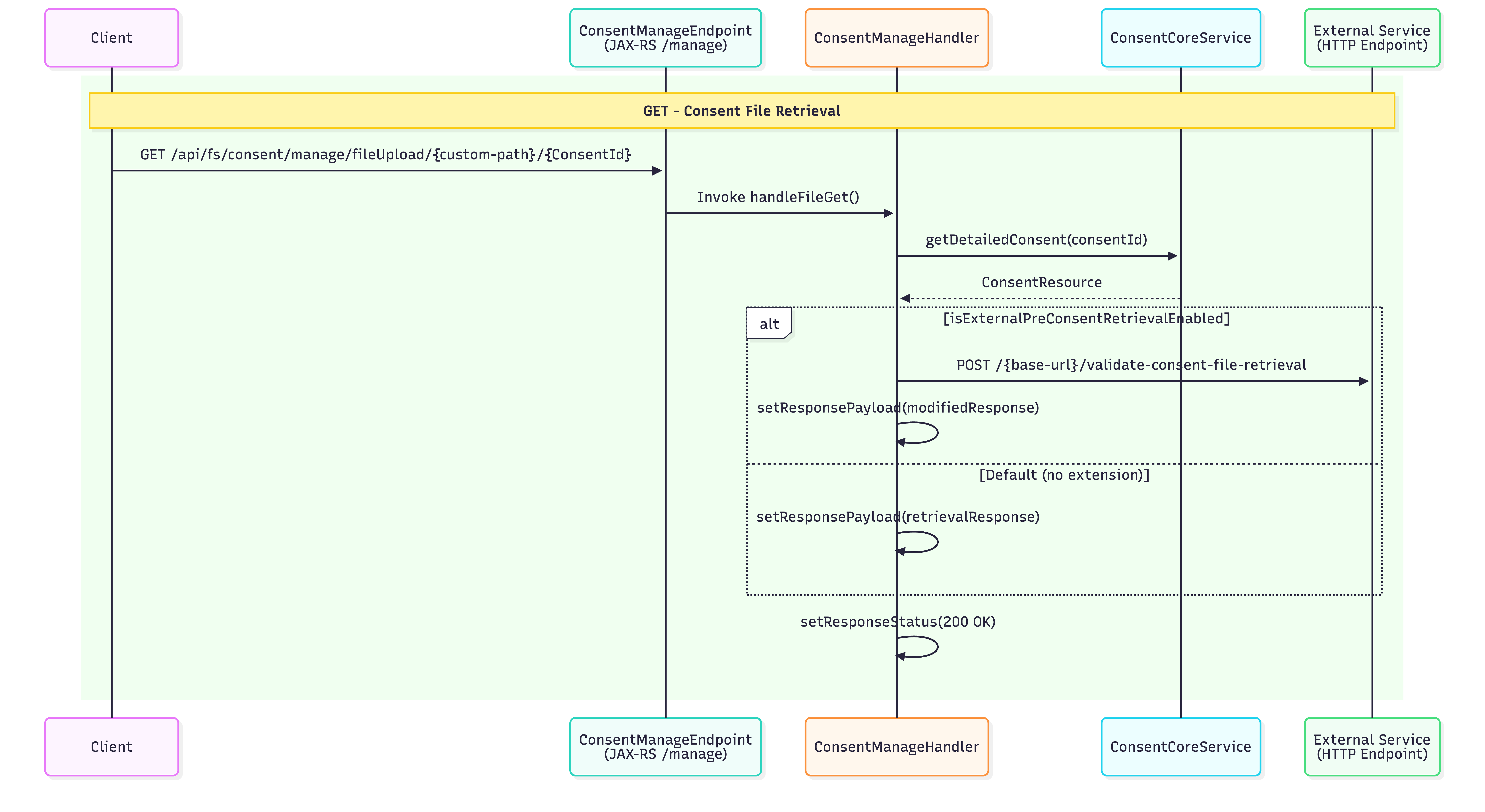
Consent File Retrieval
After a file is uploaded for consent, it can be retrieved using the file retrieval endpoint.
Sample Request:
curl --location 'https://localhost:9446/api/fs/consent/manage/fileUpload/file-payment-consents/<CONSENT_ID>' \
  -H 'x-wso2-client-id: <CLIENT_ID>' \
  -H 'Authorization: Basic <AUTH_HEADER_VALUE>' \
  -H 'x-fapi-interaction-id: <INTERACTION_ID>' \
  --cert <TRANSPORT_PUBLIC_KEY_FILE_PATH> --key <TRANSPORT_PRIVATE_KEY_FILE_PATH>
Sample Response:
The response returns the file content:
<Document xmlns="urn:iso:std:iso:20022:tech:xsd:pain.001.001.08" xmlns:xsi="http://www.w3.org/2001/XMLSchema-instance">
  <CstmrCdtTrfInitn>
    <GrpHdr>
      <MsgId>ABC/120928/CCT001</MsgId>
      <CreDtTm>2012-09-28T14:07:00</CreDtTm>
      <NbOfTxs>2</NbOfTxs>
      <CtrlSum>70</CtrlSum>
      <InitgPty>
        <Nm>ABC Corporation</Nm>
        <PstlAdr>
          <StrtNm>Times Square</StrtNm>
          <BldgNb>7</BldgNb>
          <PstCd>NY 10036</PstCd>
          <TwnNm>New York</TwnNm>
          <Ctry>US</Ctry>
        </PstlAdr>
      </InitgPty>
    </GrpHdr>
    <PmtInf>
      <PmtInfId>ABC/086</PmtInfId>
      <PmtMtd>TRF</PmtMtd>
      <BtchBookg>false</BtchBookg>
      <ReqdExctnDt>
        <Dt>2026-10-01</Dt>
      </ReqdExctnDt>
      <PmtTpInf>
        <LclInstrm>UK.OBIE.BAC</LclInstrm>
      </PmtTpInf>
      <Dbtr>
        <Nm>ABC Corporation</Nm>
        <PstlAdr>
          <StrtNm>Times Square</StrtNm>
          <BldgNb>7</BldgNb>
          <PstCd>NY 10036</PstCd>
          <TwnNm>New York</TwnNm>
          <Ctry>US</Ctry>
        </PstlAdr>
      </Dbtr>
      <DbtrAcct>
        <Id>
          <Othr>
            <Id>30080012343456</Id>
          </Othr>
        </Id>
      </DbtrAcct>
      <DbtrAgt>
        <FinInstnId>
          <BICFI>BBBBUS33</BICFI>
        </FinInstnId>
      </DbtrAgt>
      <CdtTrfTxInf>
        <PmtId>
          <InstrId>ABC/120928/CCT001/01</InstrId>
          <EndToEndId>ABC/4562/2012-09-08</EndToEndId>
        </PmtId>
        <Amt>
          <InstdAmt Ccy="JPY">20</InstdAmt>
        </Amt>
        <ChrgBr>SHAR</ChrgBr>
        <CdtrAgt>
          <FinInstnId>
            <BICFI>AAAAGB2L</BICFI>
          </FinInstnId>
        </CdtrAgt>
        <Cdtr>
          <Nm>DEF Electronics</Nm>
          <PstlAdr>
            <AdrLine>Corn Exchange 5th Floor</AdrLine>
            <AdrLine>Mark Lane 55</AdrLine>
            <AdrLine>EC3R7NE London</AdrLine>
            <AdrLine>GB</AdrLine>
          </PstlAdr>
        </Cdtr>
        <CdtrAcct>
          <Id>
            <Othr>
              <Id>23683707994125</Id>
            </Othr>
          </Id>
        </CdtrAcct>
        <Purp>
          <Cd>GDDS</Cd>
        </Purp>
        <RmtInf>
          <Strd>
            <RfrdDocInf>
              <Tp>
                <CdOrPrtry>
                  <Cd>CINV</Cd>
                </CdOrPrtry>
              </Tp>
              <Nb>4562</Nb>
              <RltdDt>2012-09-08</RltdDt>
            </RfrdDocInf>
          </Strd>
        </RmtInf>
      </CdtTrfTxInf>
    </PmtInf>
  </CstmrCdtTrfInitn>
</Document>
Built-in Validations
The Consent Manage endpoints perform the following built-in validations before invoking OpenAPI extensions:
Common Validations (All Endpoints)
All Consent Manage endpoints perform these basic validations:
x-fapi-interaction-idvalidation: Checks if the request contains the header. If absent, a new UUID is generated and added to the response headers- Client ID presence validation: Ensures the client ID is included in the request
- Client ID validity check: Verifies the client ID corresponds to a valid, existing client
- Request path validation: Confirms the request path is not null
Endpoint-Specific Validations
| Endpoint | Additional Validations | OpenAPI Extension Invoked |
|---|---|---|
| Create | • Idempotency validation | pre-process-consent-creation |
| Retrieve | • Consent ID validation • Consent-bound client ID validation |
pre-process-consent-retrieval |
| Revoke | • Consent ID validation • Consent-bound client ID validation |
pre-process-consent-revoke |
| File Upload | • Consent ID validation • Consent-bound client ID validation • Idempotency validation |
pre-process-consent-file-upload |
| File Retrieval | • Consent ID validation • Consent-bound client ID validation |
pre-process-consent-file-retrieval |
Validation Details
- Consent ID validation: Extracts and verifies the consent ID exists in the system
- Consent-bound client ID validation: Ensures the client ID matches the one associated with the consent
- Idempotency validation: Prevents duplicate operations
Customization
WSO2 Open Banking IAM Accelerator 4.0.0 onwards supports OpenAPI-based extensions for consent management customizations. For more information, see Open API Based Extensions for Consent Manage Endpoints.
Top