Customize the Consent Page
During the consent authorization process, an API consumer requests the banking information that the API consumer application needs to access. Then, the bank redirects the bank user to a webpage where it displays the banking information that the API consumer application needs to access. This is known as the Consent Grant Page. WSO2 Open Banking Accelerator contains a default consent page, which can be customized to display consent details according to your requirements. The following topics explain the page structure and extension points where you can customize the consent page furthermore.
Customizing the layout of the consent grant screen
The Populate Consent Authorization Screen extension provides the flexibility to customize the consent grant screen in alignment with the UX guidelines defined by Open Banking specifications. Based on the response payload returned by this extension, the Accelerator dynamically adjusts the layout of the consent grant screen. This section explains the different consent screen layouts that correspond to various response configurations.
Click here to see the response of the Populate Consent Authorization Screen extension.
{
    "data": {
        "consentData": {
            "type": "accounts",
            "basicConsentData": {
                "Expiration Date Time": ["2025-06-02T12:14:23.061411600+05:30"],
                "Debtor Account": [
                    "Scheme Name : UK.OBIE.IBAN",
                    "Identification : 1234",
                    "Name : Account1",
                    "Secondary Identification : Account1"
                ]
            },
            "permissions": [
                {
                    "uid": "694cc9e8-49ad-45e8-953e-1c0bac16a4e3",
                    "displayValues" : [ "Read Account Information" ],
                    "initiatedAccounts" : [
                        {
                            "accountId" : "DE98765432109876543210",
                            "displayName" : "iban DE98765432109876543210",
                            "refType" : "iban"
                        }
                    ]
                },
                {
                    "uid": "d0e93e29-9fb9-4585-aa18-e682453a28b7",
                    "displayValues" : [ "Read Account Information", "Read Account Balance Information" ],
                    "initiatedAccounts" : [
                        {
                            "accountId" : "9876-543-210",
                            "displayName" : "SavingsAccount",
                            "refType" : "iban"
                        }
                    ]
                },
                {
                    "uid": "af8f5f53-fc3d-4611-a7d1-d0e356fdcada",
                    "displayValues" : [ "Read Account Information", "Read Account Transaction Information" ],
                    "initiatedAccounts" : [
                        {
                            "accountId" : "7654-321-098",
                            "displayName" : "MultiCurrencyAccount",
                            "refType" : "iban"
                        }
                    ]
                }
            ],
            "initiatedAccountsForConsent": [
                {
                    "displayName": "SavingsAccount",
                    "accountId": "1234-567-987"
                }
            ],
            "allowMultipleAccounts": true,
            "handleAccountSelectionSeparately": false,
            "isReauthorization": true,
            "consentMetadata" : {}
        },
        "consumerData": {
            "accounts": [
                {
                    "displayName": "CurrentAccount",
                    "accountId": "1234-567-987",
                    "selected": false,
                    "title": null,
                    "description": null
                },
                {
                    "displayName": "SavingsAccount",
                    "accountId": "6870-172-890",
                    "selected": false,
                    "title": "Pre-approval enabled",
                    "description": "2 other account holder(s) can share this joint account data at any time, without each others permission. You can change sharing preferences for this account by going to Settings Data sharing  Account permissions"
                }
            ]
        },
        "additionalData": [
            {
                "title": "Accounts Unavailable To Share:",
                "subtitle": "Why can't I share these accounts?",
                "description": "There are a range of reasons why certain accounts may not be available to share.For joint accounts, all account holders must elect to make the account available. For secondary user accounts, the account holder(s) must grant data sharing rights. Please contact your bank for more details.",
                "items": [
                    {
                        "item": "joint_account_2",
                        "type": null
                    },
                    {
                        "item": "secondary_joint_account_2",
                        "type": null
                    },
                    {
                        "item": "business_account_1",
                        "type": "00001"
                    }
                ]
            }
        ]
    },
    "status": "SUCCESS",
    "responseId": "request-uuid"
}
The response of the Populate Consent Authorization Screen extension consists of two main objects:
- Consent Data
- Consumer Data
- Additional Data
Consent Data
consentData encompasses all consent related data derived from the consent initiation request that needs to be sent for populating the consent authorization page. This includes:
- Consent type
- Basic consent details
- Requested permissions
- Accounts linked to each requested permission
- Accounts linked to the complete requested consent
- Whether multiple account selection is allowed
- Whether account selection page must be shown separately
- Whether this is a re-authorization of a previously authorized consent
- Additional metadata for the consent persistence step (not shown on the page)
The table below describes the data elements included in the consentData object.
Consent Type
type refers to the type of the consent being authorized (e.g., accounts, confirmation of funds, payments).
Basic Consent Details
basicConsentData includes separate lists of consent-related information to display on the consent page. These details will be displayed in the following format:
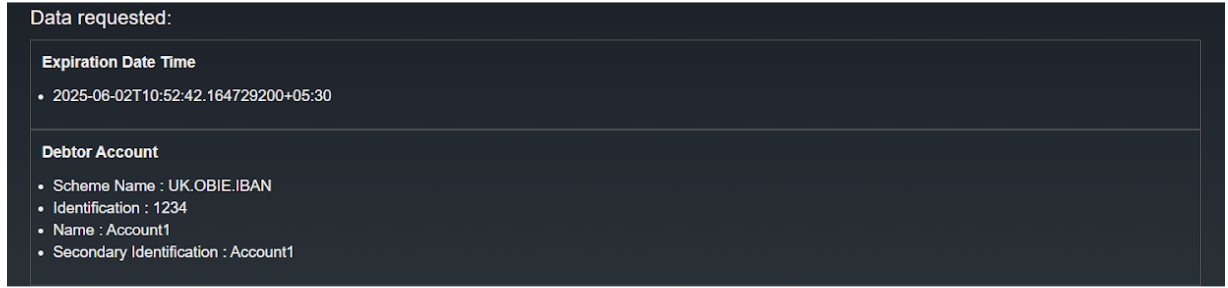
Click here to see the payload structure for the above format.
"basicConsentData": {
    "Expiration Date Time": ["2025-06-02T12:14:23.061411600+05:30"],
    "Debtor Account": [
        "Scheme Name : UK.OBIE.IBAN",
        "Identification : 1234",
        "Name : Account1",
        "Secondary Identification : Account1"
    ]
}
Requested Permissions
permissions object includes permissions to be displayed in the consent grant page. Each permission can have initiatedAccounts, a list of accounts to which each of the permissions are requested at consent initiation.
If the permissions object contains initiatedAccounts, the RequestedPermission section would look like below:
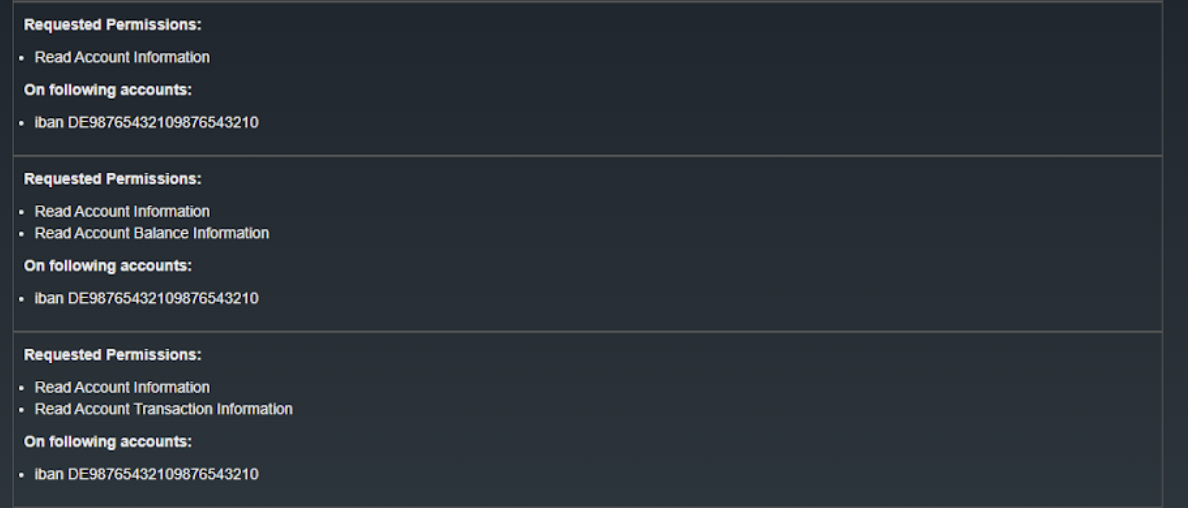
Click here to see the payload structure for the above format.
"permissions" : [
    {
        "uid": "694cc9e8-49ad-45e8-953e-1c0bac16a4e3",
        "displayValues" : [ "Read Account Information" ],
        "initiatedAccounts" : [
            {
                "accountId" : "DE98765432109876543210",
                "displayName" : "iban DE98765432109876543210",
                "refType" : "iban"
            }
        ]
    },
    {
        "uid": "d0e93e29-9fb9-4585-aa18-e682453a28b7",
        "displayValues" : [ "Read Account Information", "Read Account Balance Information" ],
        "initiatedAccounts" : [
            {
                "accountId" : "DE98765432109876543210",
                "displayName" : "iban DE98765432109876543210",
                "refType" : "iban"
            }
        ]
    },
    {
        "uid": "af8f5f53-fc3d-4611-a7d1-d0e356fdcada",
        "displayValues" : [ "Read Account Information", "Read Account Transaction Information" ],
        "initiatedAccounts" : [
            {
                "accountId" : "DE98765432109876543210",
                "displayName" : "iban DE98765432109876543210",
                "refType" : "iban"
            }
        ]
    }
]
If the permissions object does not contain initiatedAccounts, the RequestedPermission section would look like this:
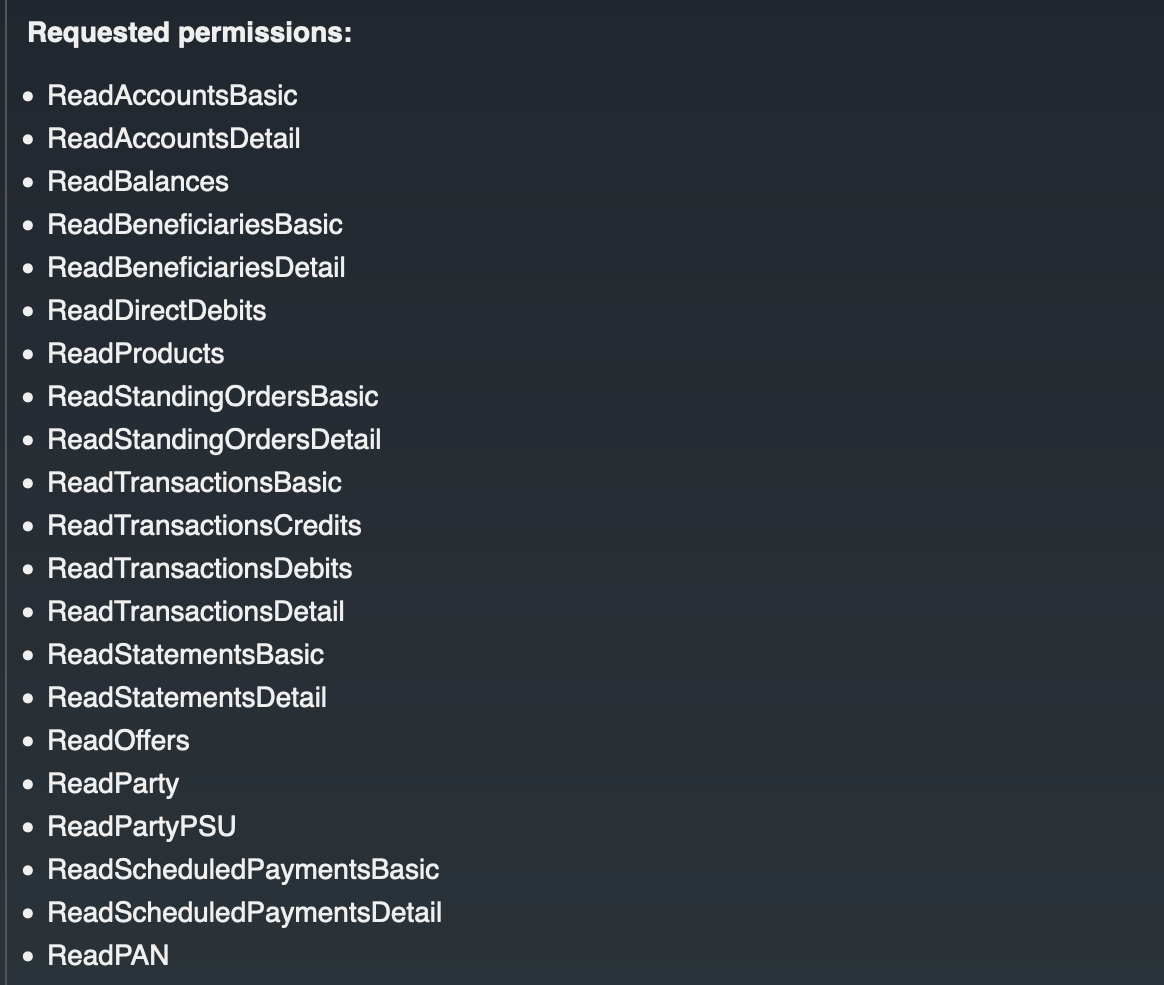
Click here to see the payload structure for the above format.
"permissions" : [
    {
        "uid": "694cc9e8-49ad-45e8-953e-1c0bac16a4e3",
        "displayValues" : [ "Read Account Information" ],
        "initiatedAccounts" : []
    },
    {
        "uid": "d0e93e29-9fb9-4585-aa18-e682453a28b7",
        "displayValues" : [ "Read Account Information", "Read Account Balance Information" ],
        "initiatedAccounts" : []
    },
    {
        "uid": "af8f5f53-fc3d-4611-a7d1-d0e356fdcada",
        "displayValues" : [ "Read Account Information", "Read Account Transaction Information" ],
        "initiatedAccounts" : []
    }
]
Note
- If a permission has no
initiatedAccountsand the consent has noinitiatedAccountsForConsent, a selectable list of consumer accounts are displayed under that permission. If no consumer accounts are added to the payload either, an error would be displayed in place. - All account objects (in
initiatedAccounts,initiatedAccountsForConsent, andconsumer accounts) support additional properties (in addition to the only required propertydisplayName) that would not be displayed or pushed to the consent grant page. But any additional property added to this response will be returned to thepersist-authorized-consentendpoint.
Initiated Accounts for Consent
initiatedAccountsForConsent are accounts linked to the entire consent. If permissions are specified, these accounts are shown under each permission. If no permissions are specified, they are shown for the entire consent. Initiated accounts for consent will be displayed in the following format:

Note
If both initiatedAccounts (permission-level) and initiatedAccountsForConsent (consent-level) objects contain account definitions, the consent-level accounts in initiatedAccountsForConsent take precedence and are implicitly linked to all permissions, overriding any permission-level account assignments.
Allow Multiple Account Selection
allowMultipleAccounts boolean parameter decides whether multiple accounts are allowed per permission/consent. If true, a list of account checkboxes are displayed. If false, a select is displayed instead. The default value is false.
If allowMultipleAccounts is true, the accounts selection will be as follows:
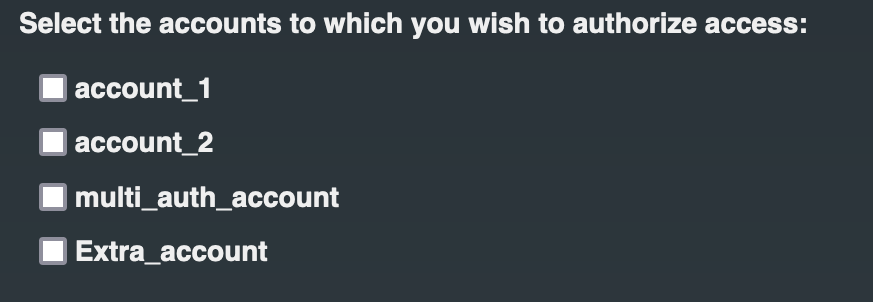
If allowMultipleAccounts is false, the accounts selection will be as follows:

Should Handle Account Selection Separately
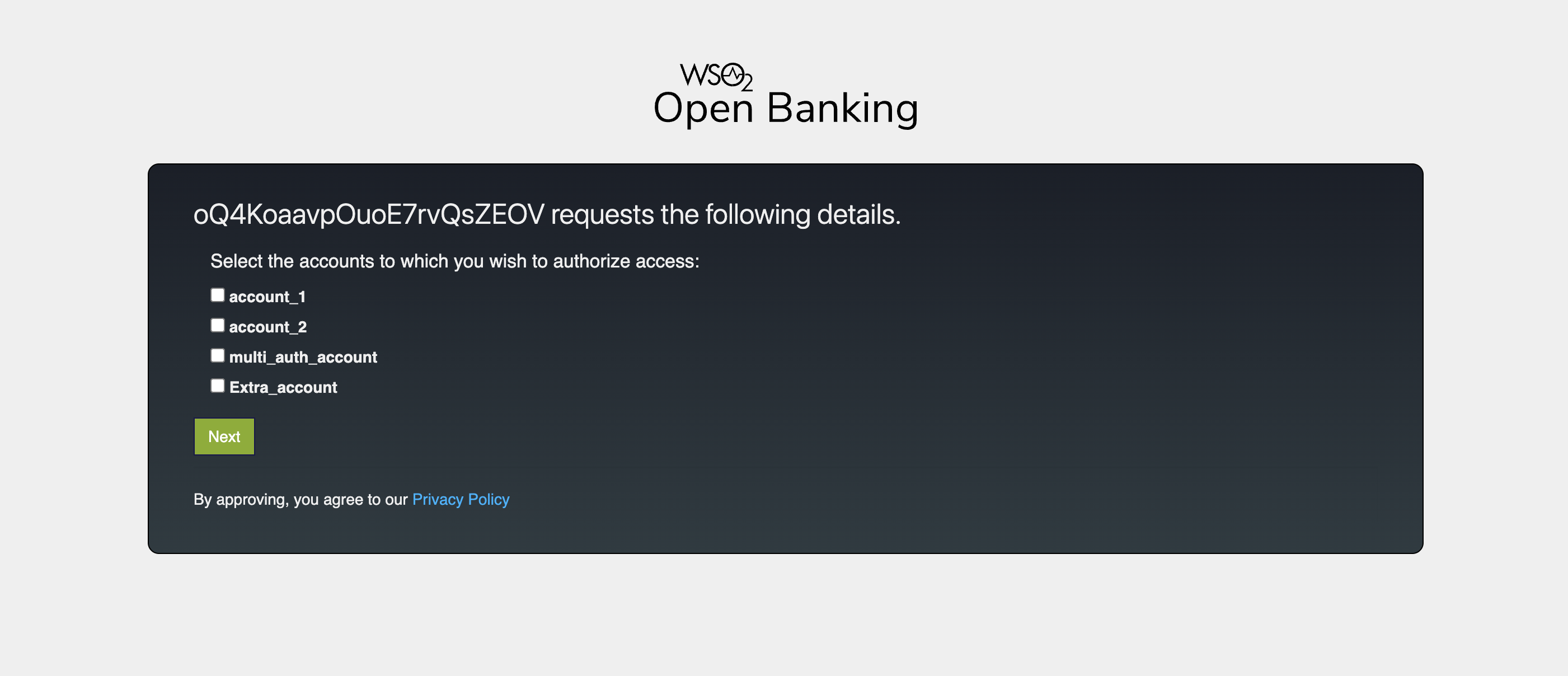
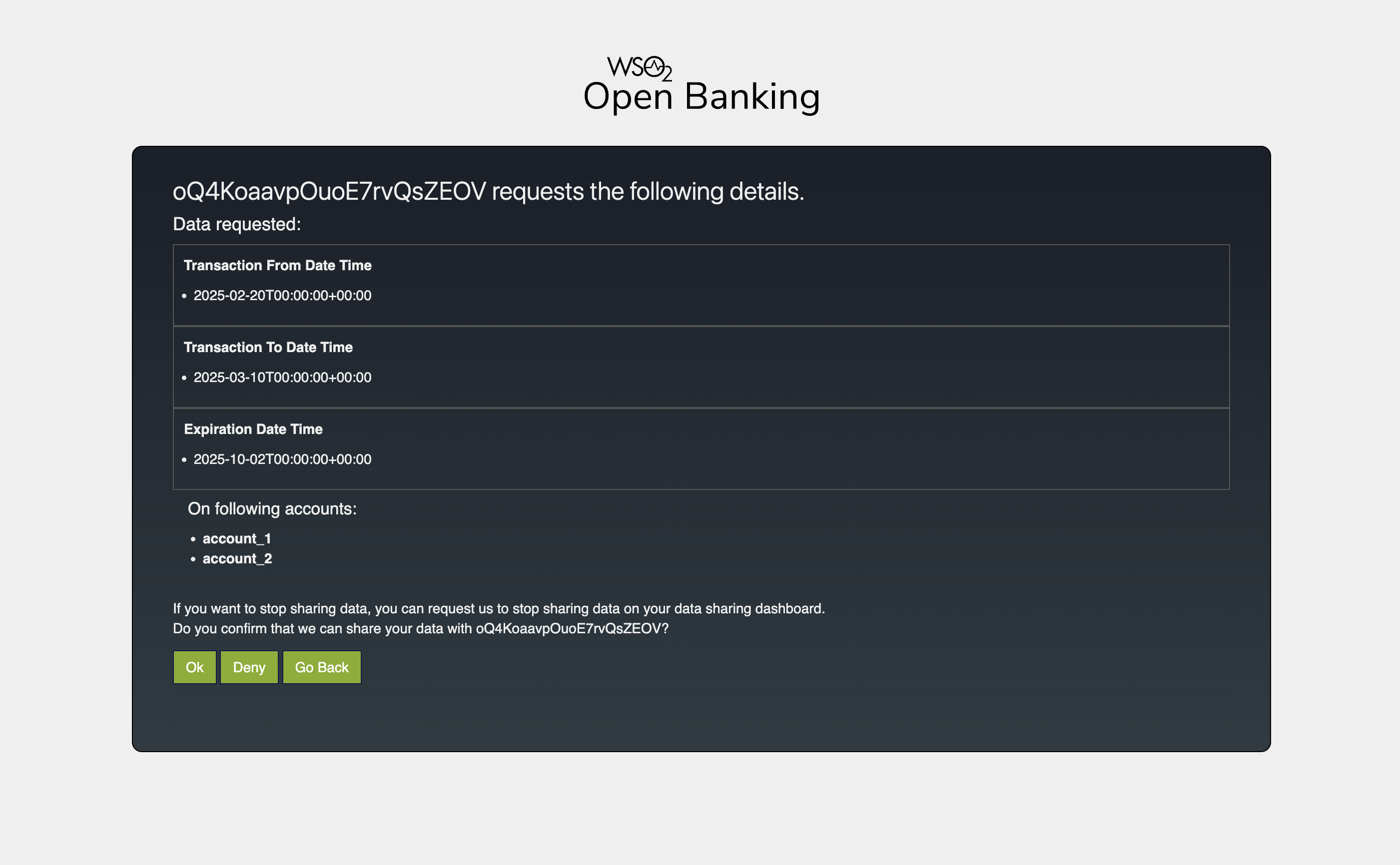
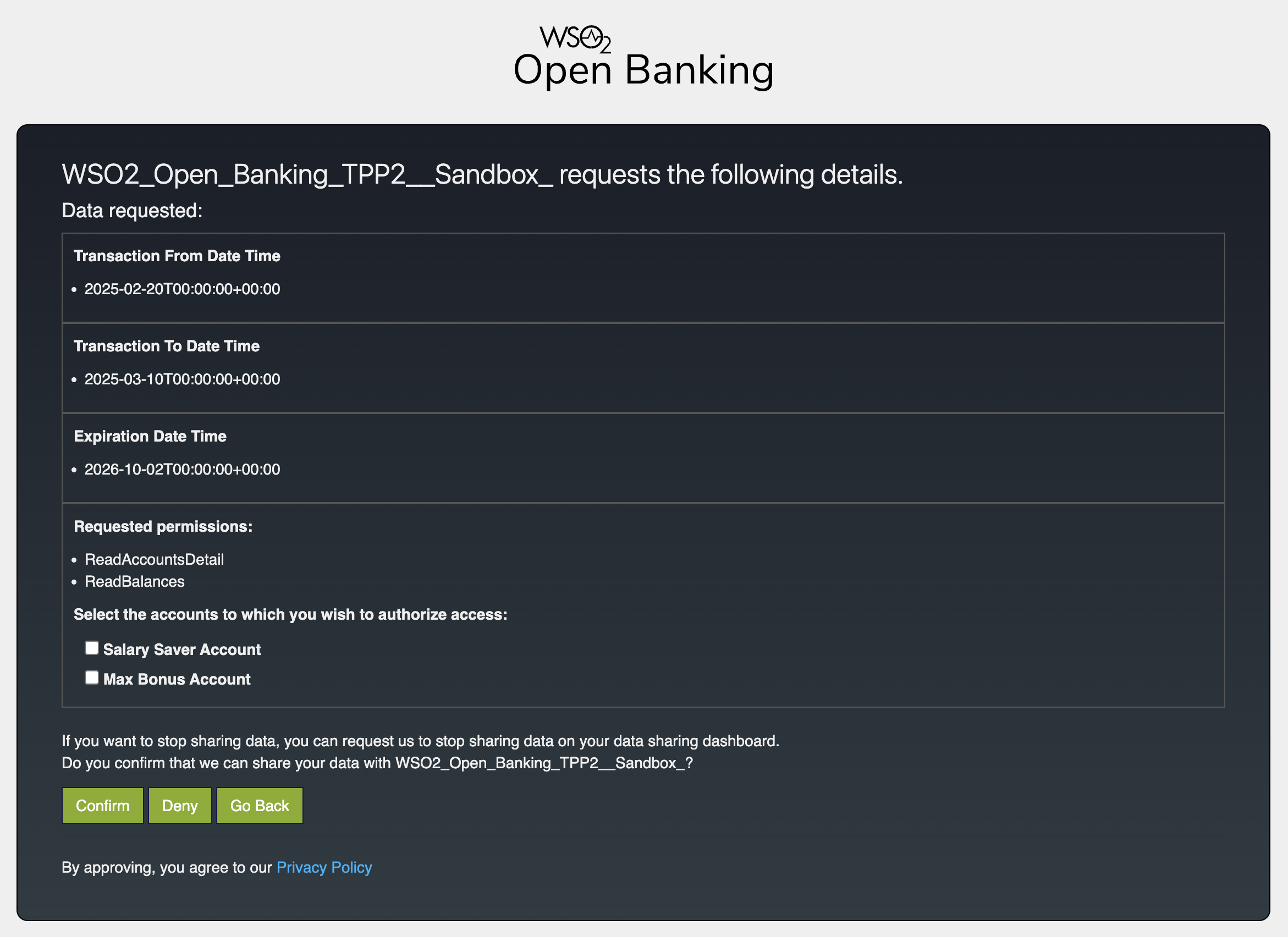
handleAccountSelectionSeparately boolean parameter determines whether the account selection and consent details are displayed on separate pages or combined. When set to true, the account selection page is shown first; once the user selects their accounts and clicks "Next," a subsequent page displays the selected accounts alongside consent details for final approval. When set to false, both account selection and consent details are consolidated into a single page, allowing the user to approve the consent immediately.
If handleAccountSelectionSeparately is true, the consent page will be as follows:
If handleAccountSelectionSeparately is false, the consent page will be as follows:
Is Reauthorization
isReauthorization indicates whether the authorization is for a consent that has already been authorized. For re-authorization requests, following content will be displayed.

Consent Metadata
consentMetadata contains additional data hidden from the PSU but sent to the persist-authorized-consent endpoint for use by the service extension.
Consumer Data
The consumerData object contains all consumer-related information retrieved from the banking backend. This includes the accounts the user can access, which are available for selection when neither initiatedAccountsForConsent nor initiatedAccounts for a permission are provided.
Consumer Accounts
accounts object under the consumerData object contains the bank accounts belonging to the user. Each account is represented by a displayName and an accountId. An optional selected property, decides whether the account is pre-selected or not. It can be either set to true or false. If true, the account will be pre-selected when displayed, before any user action.

Click here to see the consumer accounts object.
"accounts" : [
    {
        "displayName" : "account_1",
        "accountId" : "30080012343456",
        "selected" : false
    },
    {
        "displayName" : "account_2",
        "accountId" : "30080098763459",
        "selected" : true
    },
    {
        "displayName" : "multi_auth_account",
        "accountId" : "30080098971337",
        "selected" : false
    },
    {
        "displayName" : "Extra_account",
        "accountId" : "650-000 N1232",
        "selected" : true
    }
]
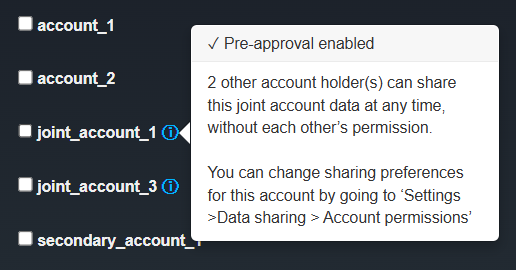
An optional title and description can also be provided for each account. When present, an info icon is displayed next to the account name. Clicking the icon opens a popover showing title as the header and description as the body text.
Click here to see the consumer accounts object.
"accounts" : [
    {
        "displayName" : "account_1",
        "accountId" : "30080012343456",
        "selected" : false
        "title" : null,
        "description" : null
    },
    {
        "displayName" : "account_2",
        "accountId" : "30080098763459",
        "selected" : false
        "title" : null,
        "description" : null
    },
    {
        "displayName" : "joint_account_1",
        "accountId" : "30080098971337",
        "selected" : false,
        "title" : "Pre-approval enabled",
        "description" : "2 other account holder(s) can share this joint account data at any time, without each others permission. You can change sharing preferences for this account by going to Settings Data sharing Account permissions"
    },
    {
        "displayName" : "joint_account_2",
        "accountId" : "30080098971337",
        "selected" : false
        "title" : "Pre-approval enabled",
        "description" : "2 other account holder(s) can share this joint account data at any time, without each others permission. You can change sharing preferences for this account by going to Settings Data sharing Account permissions"
    },
    {
        "displayName" : "secondary_account_1",
        "accountId" : "650-000 N1232",
        "selected" : false
        "title" : null,
        "description" : null
    }
]
Additional Data
The additionalData object is an optional list of informational sections that can be displayed on the account selection page. Each section renders a title, an optional subtitle with a tooltip, and a flat list of display items. This is useful for surfacing supplementary information alongside the consent details — for example, accounts that exist in the banking system but could not be linked to the consent due to eligibility restrictions.
Additional Data Items
Each entry in the additionalData array is rendered as a titled section containing a list of items. The subtitle field, when provided, is displayed alongside a tooltip icon; hovering over it reveals the full description text.
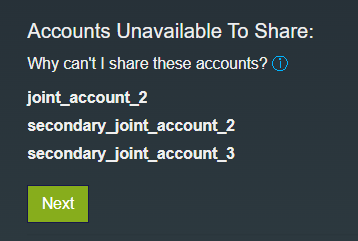
Click here to see the payload structure for the above format.
"additionalData": [
    {
        "title": "Accounts Unavailable To Share:",
        "subtitle": "Why can't I share these accounts?",
        "description": "There are a range of reasons why certain accounts may not be available to share. For joint accounts, all account holders must elect to make the account available. For secondary user accounts, the account holder(s) must grant data sharing rights. Please contact your bank for more details.",
        "items": [
            {
                "item": "joint_account_2",
                "type": null
            },
            {
                "item": "secondary_joint_account_2",
                "type": null
            },
            {
                "item": "secondary_joint_account_3",
                "type": null
            }
        ]
    }
]
The table below describes the fields in each additionalData section object.
| Field | Type | Required | Description |
|---|---|---|---|
title |
String | Yes | Section heading displayed above the item list. |
subtitle |
String | No | Short label shown inline with a tooltip icon. |
description |
String | No | Full tooltip text revealed on hover when subtitle is present. |
items |
Array | Yes | List of display items for this section. |
items[].item |
String | Yes | The text displayed for this entry. |
items[].type |
String | No | The text used to filter out the items |
Note
The type field can be used to filter additionalData items in a custom financial_services.consent.authorize_jsp JSP file.
Customize the theme of the consent page
The consent page displays the banking information that the API consumer application needs to access. Below is the consent page designed for the sample Account Information Service API available in WSO2 Open Banking Accelerator:
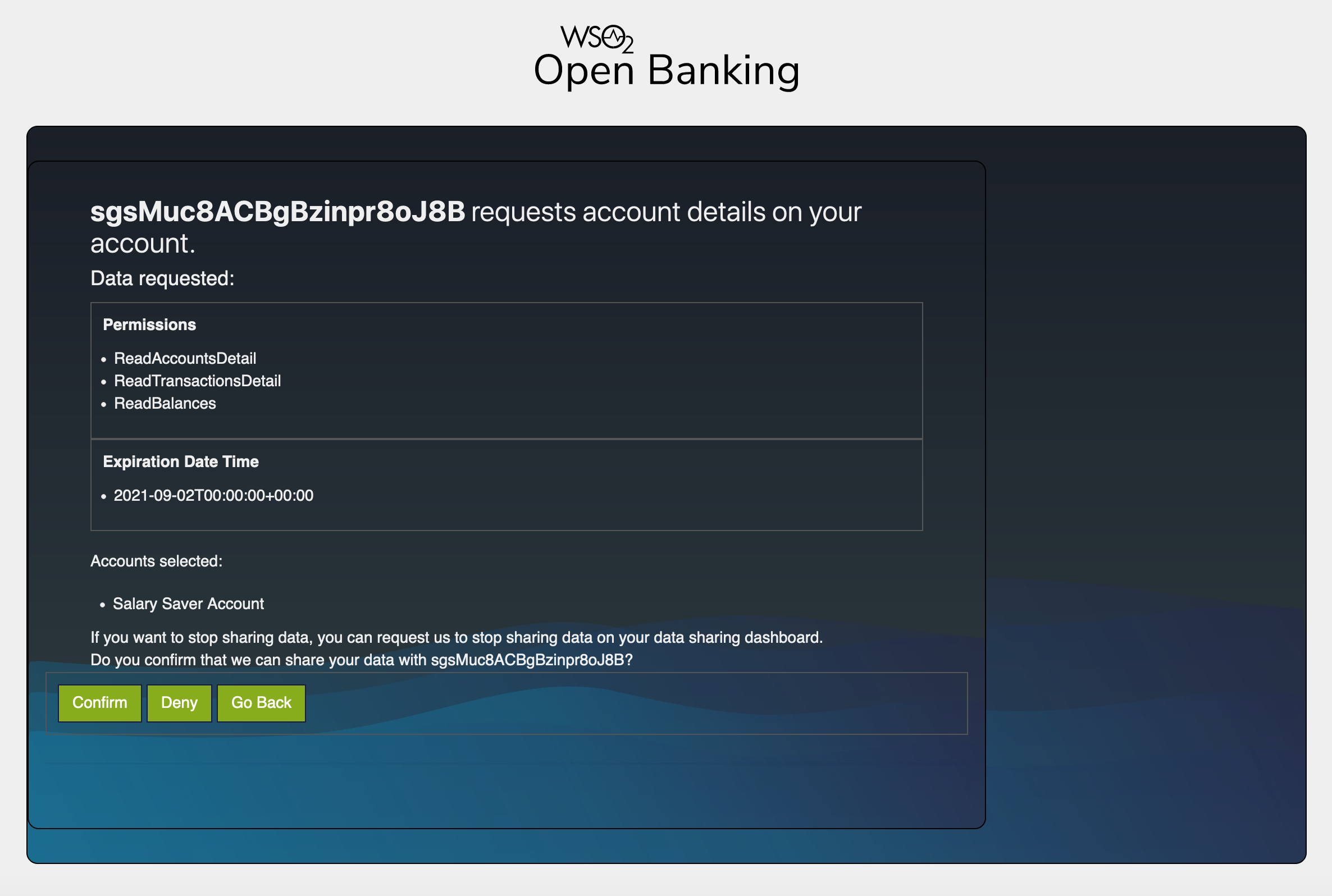
If the bank wishes to customize the theme of the existing consent page, they can modify the files in the following directories:
| Requirement | Path to the relevant file |
|---|---|
| Change the style sheet | <IS_HOME>/repository/deployment/server/webapps/ob#authenticationendpoint/css |
| Change the images | <IS_HOME>/repository/deployment/server/webapps/ob#authenticationendpoint/images |
| Change the existing JavaScript files | <IS_HOME>/repository/deployment/server/webapps/ob#authenticationendpoint/js |
| Change the default font | <IS_HOME>/repository/deployment/server/webapps/ob#authenticationendpoint/fonts |