Tryout Confirmation Of Funds Flow
This document provides step by step instructions to deploy, subscribe, and invoke the Confirmation of Funds API.
Before trying out the flow, make sure the you have created roles and users by following Create User and Roles.
Note
In the following steps, there are JWTs that's needed to be created where the payload has to be changed. Hence, use the following certificates to sign the JWT in following steps:
For transport layer also use the same certificates.
Invoking Confirmation of Funds API
Generating application access token
Once you register the application, generate an application access token.
-
Generate the client assertion by signing the following JSON payload using supported algorithms. For the Transport Layer Security purposes in this sample flow, you can use the certificates mentioned above.
{ "alg": "<The algorithm used for signing.>", "kid": "<The thumbprint of the certificate.>", "typ": "JWT" } { "iss": "<This is the issuer of the token. For example, client ID of your application>", "sub": "<This is the subject identifier of the issuer. For example, client ID of your application>", "exp": <This is the epoch time of the token expiration date/time>, "iat": <This is the epoch time of the token issuance date/time>, "jti": "<This is an incremental unique value>", "aud": "<This is the audience that the ID token is intended for. For example, https://<IS_HOST>:9446/oauth2/token>" } <signature: For DCR, the client assertion is signed by the private key of the signing certificate. For other scenarios, use the private signature of the application certificate.>eyJraWQiOiJzQ2VrTmdTV0lhdVEzNGtsUmhER3Fmd3BqYzQiLCJ0eXAiOiJKV1QiLCJhbGciOiJQUzI1NiJ9.eyJzdWIiOiJuaUlIV01VRW1mTU1IUWtnSV9WdVRJWHZSeklhIiwiYXVkIjoiaHR0cHM6Ly9sb2NhbGhvc3Q6OTQ0Ni9vYXV0aDIvdG9rZW4iLCJpc3MiOiJuaUlIV01VRW1mTU1IUWtnSV9WdVRJWHZSeklhIiwiZXhwIjoxNzU2NDEyNDI3LCJpYXQiOjE3NTI4MTI0MjcsImp0aSI6IjE3NTI4MTI0MjcxODUifQ.DAlsJG3Qj5uIUzzAVgFflsVYlN1uN8FyoBE-q_rbz-b39vTVzUhTEvUUVulIkoG5WHPGRSDG8S70_ycZLP0bdmfqmyU8l42Ze6nKSCuQkfgBGuMaIlzDnY5K3D7fvRcGGtq9f-M0vrRVVhgB8dQuhEnX4KeXKr2vTWU_qtLn6algRtAbKxU5_U5nJZhuFNW4Q8gsYKOIE51yidykvR68L2zuhQZSVbkLRFlu0FV4dBVbrY8noQBbnMNwssmr5sU-LCsSYHvUOjRBmN2tOVyZfcMK-97mqqxvkDeiRpRFgwH5qhu3CsNXeTKYlnDji4GNnLQLbkSddba6_APU_zCTFQ -
Run the following cURL command in a command prompt to generate the access token. Update the placeholders with relevant values.
curl -X POST \ https://<IS_HOST>:9446/oauth2/token \ --cert <TRANSPORT_PUBLIC_KEY_FILE_PATH> --key <TRANSPORT_PRIVATE_KEY_FILE_PATH> \ -d 'grant_type=client_credentials&scope=fundsconfirmation%20openid&client_assertion_type=urn:ietf:params:oauth:client-assertion-type:jwt-bearer&client_assertion=<CLIENT_ASSERTION_JWT>&redirect_uri=<REDIRECT_URI>&client_id=<CLIENT_ID>' -
Upon successful token generation, you can obtain a token as follows:
{
    "access_token": "eyJ4NXQiOiJ2b05uSEROb3ZLMF9IclNxd1BsOEJBWkVxRlUiLCJraWQiOiJPR1ZqWTJOa1pqQTVObVJtTXpFME9HUTJPRE16TlRaaU5XVm1NV0UwTWpka1pUWXhOVGc1Tm1WaE1qYzNaRGd4WlRKaVlqWXpZMkk1WWpRMU5qRTRPQV9SUzI1NiIsInR5cCI6ImF0K2p3dCIsImFsZyI6IlJTMjU2In0.eyJzdWIiOiJuaUlIV01VRW1mTU1IUWtnSV9WdVRJWHZSeklhIiwiYXV0IjoiQVBQTElDQVRJT04iLCJiaW5kaW5nX3R5cGUiOiJjZXJ0aWZpY2F0ZSIsImlzcyI6Imh0dHBzOlwvXC9sb2NhbGhvc3Q6OTQ0Nlwvb2F1dGgyXC90b2tlbiIsImNsaWVudF9pZCI6Im5pSUhXTVVFbWZNTUhRa2dJX1Z1VElYdlJ6SWEiLCJhdWQiOiJuaUlIV01VRW1mTU1IUWtnSV9WdVRJWHZSeklhIiwibmJmIjoxNzUyODEyNDI3LCJhenAiOiJuaUlIV01VRW1mTU1IUWtnSV9WdVRJWHZSeklhIiwib3JnX2lkIjoiMTAwODRhOGQtMTEzZi00MjExLWEwZDUtZWZlMzZiMDgyMjExIiwic2NvcGUiOiJmdW5kc2NvbmZpcm1hdGlvbnMiLCJjbmYiOnsieDV0I1MyNTYiOiIyRWdvcEhGNmNiYlh0OTVJNThFNjlWRVdCVFpZZ0ZpckJVOXVnZDZEOURBIn0sImV4cCI6MTc1MjgxNjAyNywib3JnX25hbWUiOiJTdXBlciIsImlhdCI6MTc1MjgxMjQyNywiYmluZGluZ19yZWYiOiI2YmRhMWFlMTQ4MDk5NDA0MjY5ZTY3MmE0Y2JlOGJhZSIsImp0aSI6IjRhN2IxZDhiLWFkYzMtNDFkZC1iMDg1LTAyNTFlOTIxN2VkZCJ9.ZhPolC0xpnshtIM3kyBMfIrkdZpP8j12rdodnoYoM2EmZBNdVj824_zEGHMcEvlfSkQGhmutuCpuDt6l83dqvPz6BU9mMgmRerFK8P7Gaxhl9ZLfzpNkjzIc8O_CmTSOv7Lx36WCdc_lwmN-DtiWGXR2aENggsFvVBvU-W-KWtbsafnluJdSNjzrRYH8zoS_F4uHuNNqPLWkd_uXV2027uU8LtD1btaAlfyXYS3qgxm8bCR5O8UxdYiBDlmdPv_32GUeMiqrwLOplxmnnwXD8Ol1BTfGkGK6PH4M-9J885OFV0WgRcU3eP_k7iupo0LhYqU4oUeMG0Y9CsmeQk5JsQ",
    "scope": "fundsconfirmations",
    "token_type": "Bearer",
    "expires_in": 3600
}
Initiating a funds-confirmation consent
In this step, the TPP generates a request to get the consent of the user to confirm the funds available in the bank account.
-
Create a funds-confirmation consent using the following request format:
curl -X POST \ https://localhost:8243/open-banking/v3.1/cbpii/funds-confirmation-consents \ -H 'Authorization: Bearer <APPLICATION_ACCESS_TOKEN>' \ -H 'Content-Type: application/json' \ -H 'Accept: application/json' \ --cert <TRANSPORT_PUBLIC_KEY_FILE_PATH> --key <TRANSPORT_PRIVATE_KEY_FILE_PATH> \ -d ' { "Data": { "ExpirationDateTime": "2025-07-23T09:50:27.138550+05:30", "DebtorAccount": { "SchemeName": "OB.IBAN", "Identification": "1234", "Name": "Account1", "SecondaryIdentification": "Account1" } } }' -
The response contains a Consent Id. A sample response is as follows:
{
    "Data": {
        "StatusUpdateDateTime": "2025-07-18T09:50:28+05:30",
        "Status": "AwaitingAuthorisation",
        "DebtorAccount": {
            "SecondaryIdentification": "Account1",
            "SchemeName": "OB.IBAN",
            "Identification": "1234",
            "Name": "Account1"
        },
        "CreationDateTime": "2025-07-18T09:50:28+05:30",
        "ExpirationDateTime": "2025-07-23T09:50:27.138550+05:30",
        "ConsentId": "7c92f313-2cf0-46b7-b4a1-b7260a49478f"
    }
}
Authorizing a consent
The TPP application redirects the bank customer to authenticate and approve/deny application-provided consents.
-
Generate the request object by signing the following JSON payload using supported algorithms.
{ "kid": "<CERTIFICATE_FINGERPRINT>", "alg": "<SUPPORTED_ALGORITHM>", "typ": "JWT" } { "max_age": 86400, "aud": "<This is the audience that the ID token is intended for. e.g., https://<IS_HOST>:9446/oauth2/token>", "scope": "fundsconfirmation openid", "iss": "<APPLICATION_ID>", "claims": { "id_token": { "acr": { "values": [ "urn:openbanking:psd2:sca", "urn:openbanking:psd2:ca" ], "essential": true }, "openbanking_intent_id": { "value": "<CONSENTID>", "essential": true } }, "userinfo": { "openbanking_intent_id": { "value": "<CONSENTID>", "essential": true } } }, "response_type": "<code:Retrieves authorize code/code id_token: Retrieves authorize token and ID token>", "redirect_uri": "<CLIENT_APPLICATION_REDIRECT_URI>", "state": "YWlzcDozMTQ2", "exp": <EPOCH_TIME_OF_TOKEN_EXPIRATION>, "nonce": "<PREVENTS_REPLAY_ATTACKS>", "client_id": "<APPLICATION_ID>" }eyJraWQiOiJzQ2VrTmdTV0lhdVEzNGtsUmhER3Fmd3BqYzQiLCJ0eXAiOiJKV1QiLCJhbGciOiJQUzI1NiJ9.eyJhdWQiOiJodHRwczovL2xvY2FsaG9zdDo5NDQ2L29hdXRoMi90b2tlbiIsIm5iZiI6MTc1MjgxMjQyOCwiY3JpdCI6e30sInNjb3BlIjoib3BlbmlkIGZ1bmRzY29uZmlybWF0aW9ucyBvcGVuaWQiLCJjbGFpbXMiOnsiaWRfdG9rZW4iOnsiYWNyIjp7InZhbHVlcyI6WyJ1cm46b3BlbmJhbmtpbmc6cHNkMjpjYSIsInVybjpvcGVuYmFua2luZzpwc2QyOnNjYSJdLCJlc3NlbnRpYWwiOnRydWV9LCJvcGVuYmFua2luZ19pbnRlbnRfaWQiOnsidmFsdWUiOiI3YzkyZjMxMy0yY2YwLTQ2YjctYjRhMS1iNzI2MGE0OTQ3OGYiLCJlc3NlbnRpYWwiOnRydWV9fSwidXNlcmluZm8iOnsib3BlbmJhbmtpbmdfaW50ZW50X2lkIjp7InZhbHVlIjoiN2M5MmYzMTMtMmNmMC00NmI3LWI0YTEtYjcyNjBhNDk0NzhmIiwiZXNzZW50aWFsIjp0cnVlfX19LCJpc3MiOiJuaUlIV01VRW1mTU1IUWtnSV9WdVRJWHZSeklhIiwicmVzcG9uc2VfdHlwZSI6ImNvZGUgaWRfdG9rZW4iLCJyZWRpcmVjdF91cmkiOiJodHRwczovL3d3dy5nb29nbGUuY29tL3JlZGlyZWN0cy9yZWRpcmVjdDEiLCJzdGF0ZSI6IjAxZjFjZDc0LTkwYWItNDVhOS04ZjYyLWNmZjcwMTA1NDZkMCIsImV4cCI6MTc1MjgxNTkwOCwibm9uY2UiOiIxOTY0ODZmOS1hOTJkLTQ3OWQtODdmNS0zZjdjOWRjMmYyMmIiLCJjbGllbnRfaWQiOiJuaUlIV01VRW1mTU1IUWtnSV9WdVRJWHZSeklhIn0.OEpfruJB5-XsFqK8ldFmzr9w6pVnr9-aSwXIWSTLyb6SBo684vp55kp91BzBCcara2IkyBcwWvaHvIQIXj_cp3Tl6mdLp-shgvwu-Vpu_1OCUclbu1MVIKRukeX3ATHVgyWbXUPEF0ukCT8h9_uehzLEUaizTfgUF8k8ipaqLYnyLm4prywf3_O7_dFe9stwyvlJjgWNtx6uDI0OIrsimj0gsRnCBghMzzSrXmUxeTJdjXglHRSZdHN6Ze-AqdpkWnPP8pL2Atah9lWJvTGmvJIQYYDZHYiEQQgtBzGO2TbTbcWrolJBvn-AJMGNqioJGJdcJ9kWCojb61KnIpYEWg -
The bank sends the request to the customer stating the accounts and information that the API consumer wishes to access. This request is in the format of a URL as follows.
Update the placeholders with relevant values and run the following in a browser to prompt the invocation of the authorize API.
https://<IS_HOST>:9446/oauth2/authorize?response_type=code%20id_token&client_id=<CLIENT_ID>&scope=fundsconfirmation%20op enid&redirect_uri=<APPLICATION_REDIRECT_URI>&state=YWlzcDozMTQ2&request=<REQUEST_OBJECT>&prompt=login&nonce=<REQUEST_OBJECT_NONCE> -
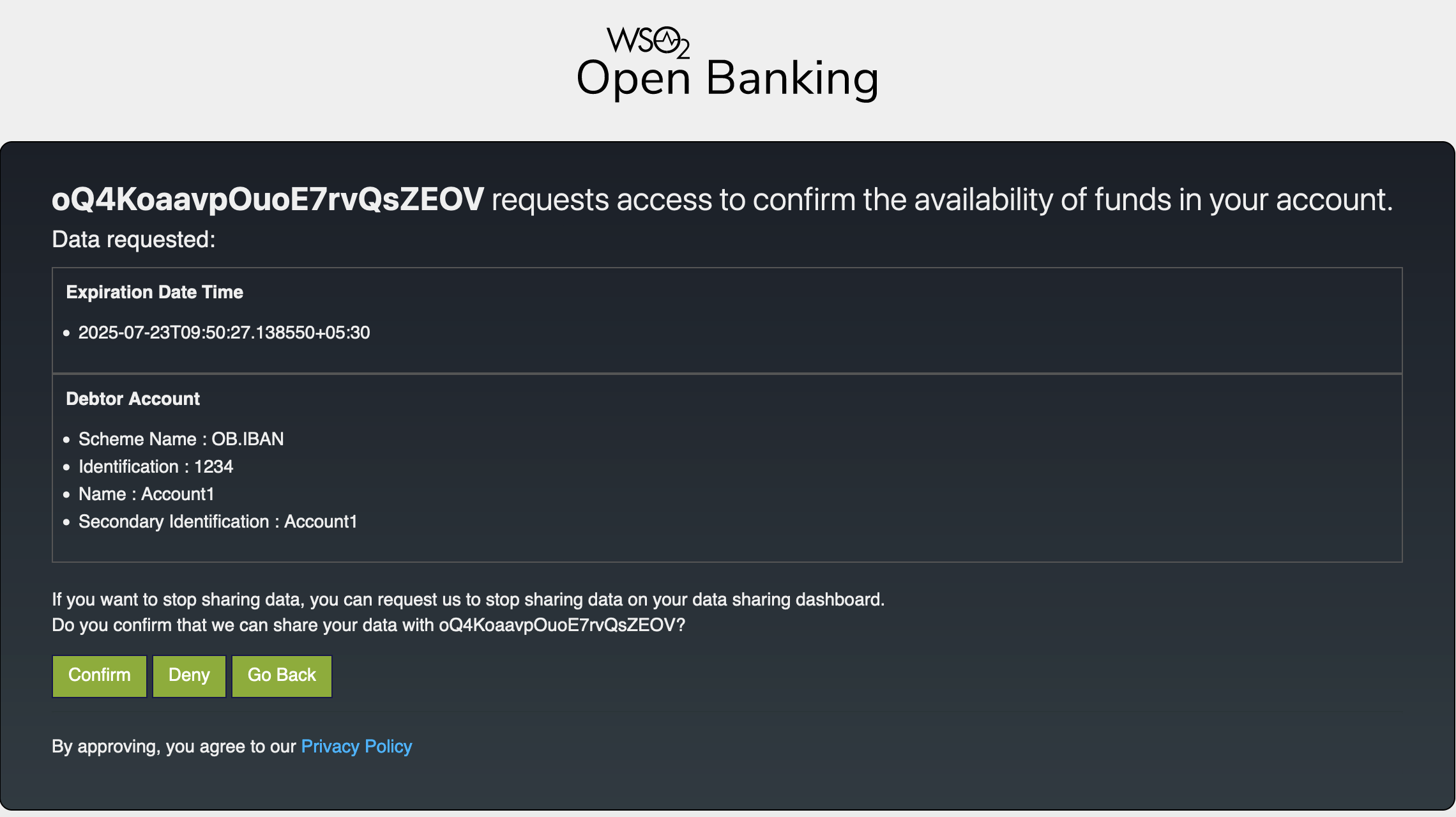
Upon successful authentication, the user is redirected to the consent authorize page. Use the login credentials of a user that has relevant role.

-
The page displays the data requested by the consent such as debtor account and expiration date.
-
Click Confirm.
-
Upon providing consent, an authorization code is generated on the web page of the redirect_uri. See the sample given below:
https://www.google.com/redirects/redirect1#id_token=eyJraWQiOiJxR1NxMjZJZXpjbDhPdVNEVjg5SmlLQVlEdVkiLCJjdHkiOiJKV1QiLCJlbmMiOiJBMjU2R0NNIiwiYWxnIjoiUlNBLU9BRVAifQ.qYgjp9znXgubkc2hDtvQmXrtlsY0LSM4mTl5mHaUlzTZ18E5vuDSbfKW9Kk5si26Fb8W60bC6bsBmoFy2E_BFRvaos05g3pUTfgt4xQoMO62jpJRXQ_QXAbI8_1tIXSJk8JHeDUjbcjztmd8CHz0HYV2dG1VeIUEBfptp1fWeiUxCRDajD4MgR6LkKDi2VpjRNLIaoaxexfNemPheRHic_sTYOMuTE8f4SXUfLAT7oeIYWDsXu-RwnkJtXBjdsvlmhiadfO2KiEd98fHqmL5Vor41uHXApJRVmt9duNDgzNNxQJopMQgN8k61yU4POdAYMZEEYZfXDV9zpBbyorlbw.E-WfrWDI92xCUAzf.NyRWc8dYUR9kxFZzM8aGUeHeyamthFQvevxktI05YNRRLjJk6FM667tV8HGaNKvpsZ64HHwqW78jymW6YhK5WyZpz3Q1lajENMfs2HuXA6arpYFSm3Zg1QDPrSoX-fnQOzfvHt9M0DlK9-ZAktxh97BHyv4D2fxP4riAjDyvgGqNviok3jjnmPBv65CAYS2DzTq6sFFJ1VDC9yWgJUGxHDehHMVV5HxKaHBvNEsmE_mqZT4rqooKYruCJ7Al1R7VAMEDk7ucW4LbrPlCzoVWfVW9S_FgOnDDOWM5eaM5-ckb1NyzN2WOqfg0Y48ADiLRKJaZf6d-vQ3RgIb7TQTkp1-pRS6rBD4KLPr22m7y-pf22pHmA05e0H1nFb61XD1eNW8WefjvIglJtk2nuY_yBixlDM2PUOGDDAdC9zqc2Csw3YAQtr428pqeFrZjzsk867f24fa_r3FaN2C5ynfoRGjdYs4V5JS-FX4ygHdkihYrCVOFs1m_HDbAkgQhhMcCvDosGbs05FRucSbDP74FDW3bTPI6Lv2IH6X-FMNNrOx2ImBQVvoDlWf1ANT7BkPFrnQu5AdyPza436m76kCyYezXVd29qU6SzaoWiuP4pU9ccEn86kd1uxw17QC30j6Ij7cD_omwWh3yMLZrGngC9gnZXfEPUApPVVXfe5dC8OpYDoA4Csr_LPYDeQHJQCzsyG8BMtKvdhz3D81QdBzA8iyDII1_283zGPumqcBKLD9-SKb2KwBIU1elOvpclzHWnVlhF8T42yTxNbUmq8mwNgCUh7hQ9id8gJP98mLRXGmEJ72KouV-lRhcxcde73tS00d-5POaTmYKlk31rGuXORYayzZ2osbRgvIIonb9ZcHz-pAAInYPex009RLlZdHyU1fJen82JK0q61JKbGMZkwRvB8pCJZOTRcVx_UmYpdo9gePiHPy_-l_yhaDs-RDQjN8AELldO3_3rb80Kj7FRX6mmWh_y8K0bT_Um-BL5IV93WT8DCztUYPUDXJaHvXryfAZHR2pjMPmRwbZZo7cX5Fz6j6bHUVpG_n-iZ61VJ87iZWeJLG2a6CKGPNUD9BvUZhUgyxzTI35awJgZroKNKM511cKzo45_oOwVCfg7DM3LNSQtS_NTFZSOTTCY2LT9X2HE00CkS5ORlStLo_WBy_8c0hMlwewNIO5JeJBvSKwE2s1MOy2rZpiSqJrrF7qyJIsQ0YVWbyS4_z7qyZGvlIaLzsLy2Syyk7PnadI8d2TD1xrPfyWsFT8BPwhGT8qut3Tn47gGiK7m3OHt_gdxucLqTNGrRq8HEViLElzT6n0_khfYcJNBYlvplp-APx9edapxPyeAiqXxMSGHpDZVn4_MUnKkBdyQO4Deoxthg8I5VEC1OX4wYFb1zoSdszrYiMah6lh4n_WCIKv00ndc4yTw3DnnbhpvG9gU5KBRO0xeda3b3VQN4ZnboRiBYfQhv_lNxRRkz5MtsYWTt_DDouSFr66eGfgVo_f-6HkXoGJzPCTJfuKonkMf_pLCfz69waMB4t5WlAZK9Hx07zO4qssj4AQfMTHmFYmntKjDdOBoK2z1a2X_LMHAjcaMNbnCOBHmgs8PDqnprJina2nFy68Oa3tXkAFxmSkmJdyG_CgoJvTTAWD3AM3WK4AUVv6W9xQOIlPzWA2r3ZUKJueBDZG3oZgK6WVmJ3UkMwrTTIeKvkCKiHLjao1rLci2JILHoab3KtCd5dS4m9CDBHIioMOw0p5IsmncKi2wZ8fkaW7HYI_8fln0EBl5nQ6TKjVoB5gKdRhkxePA0pJ-yD8FxqABMxKKyNaf1sC3RXe7_8t6M6QI6X6aJ3QG3OMJ2KHh1Ef6PYW7Km21kWDXJxosQXwnOb7ZdoKAWSi6d8A4BLOYiiaBaqWlVpvDs-Tsgbtbx9-2y1PGh3LVoUZb6bcXdISusJsZwWJHk9OJ_mM54wgYXKrG5O_4vSuOH6QqLV60u1FUxKQMUGXzURizny7SX0Sex70YDSh24zauLOl.EiYnRO7I9CZnJmhgAVHylQ&code=1c954d3c-bf10-3108-841b-7cd2ed27bcdc&session_state=729e2eb652bd4a886d19baffba03e122212a64d16858fee62b490fb8549536a0.YhcwGttgmn1zsxzGvsgYuw&state=01f1cd74-90ab-45a9-8f62-cff7010546d0
The authorization code from the below URL is in the code parameter (code=1c954d3c-bf10-3108-841b-7cd2ed27bcdc).
Generating user access token
In this section, you will be generating an access token using the authorization code generated in the section above.
-
Generate the client assertion by signing the following JSON payload using supported algorithms.
Format: { "alg": "<The algorithm used for signing.>", "kid": "<The thumbprint of the certificate.>", "typ": "JWT" } { "iss": "<This is the issuer of the token. For example, client ID of your application>", "sub": "<This is the subject identifier of the issuer. For example, client ID of your application>", "exp": <This is the epoch time of the token expiration date/time>, "iat": <This is the epoch time of the token issuance date/time>, "jti": "<This is an incremental unique value>", "aud": "<This is the audience that the ID token is intended for. For example, https://<IS_HOST>:9446/oauth2/token>" } <signature: For DCR, the client assertion is signed by the private key of the signing certificate. Otherwise, the private signature of the application certificate is used.>eyJraWQiOiJzQ2VrTmdTV0lhdVEzNGtsUmhER3Fmd3BqYzQiLCJ0eXAiOiJKV1QiLCJhbGciOiJQUzI1NiJ9.eyJzdWIiOiJuaUlIV01VRW1mTU1IUWtnSV9WdVRJWHZSeklhIiwiYXVkIjoiaHR0cHM6Ly9sb2NhbGhvc3Q6OTQ0Ni9vYXV0aDIvdG9rZW4iLCJpc3MiOiJuaUlIV01VRW1mTU1IUWtnSV9WdVRJWHZSeklhIiwiZXhwIjoxNzU2NDEyNTE2LCJpYXQiOjE3NTI4MTI1MTYsImp0aSI6IjE3NTI4MTI1MTYzNzIifQ.JyuaSrGHiC83vkcPjlvDmDhyWl_nlZslHI4TTXaWThaVRSv4ACyv17Eg3_Bhshp5oQhuHTkxj7yDH6TDOqY9zIQEV4PH_Lih-Ftdawlb-SGKVa16G-w7JXWWXZdONjxhSxnFYO7omoxDetzj4NUlA6T078-gYKrnrTPwcoOBIg95f2kJQbg_oPPHR0UWv1qW6uoxtVHcfEWzfCVN7CZhlvemUsa9JKRA2ImosRgks8U22V52eOj1GfBDMJixLDSj6FTRyE6flgcSaqwR7xxCI27pmPG2C0Gvk-6ql9cBRXrh8e2cSI9FoNACuSxaZY7I49OPTI2ZVRDQCnylGYJwew -
Run the following cURL command in a command prompt to generate the access token. Update the placeholders with relevant values.
curl -X POST \ https://<IS_HOST>:9446/oauth2/token \ -H 'Cache-Control: no-cache' \ -H 'Content-Type: application/x-www-form-urlencoded' \ --cert <PUBLIC_KEY_FILE_PATH> --key <PRIVATE_KEY_FILE_PATH> \ -d 'grant_type=authorization_code&client_assertion_type=urn%3Aietf%3Aparams%3Aoauth%3Aclient-assertion-type%3Ajwt-bearer&client_assertion=<CLIENT_ASSERTION>&code=<CODE_FROM_ABOVE_STEP>&scope=openid%20fundsconfirmation&redirect_uri=<REDIRECT_URI>' -
Upon successful token generation, you can obtain a token as follows:
{
    "access_token": "eyJ4NXQiOiJ2b05uSEROb3ZLMF9IclNxd1BsOEJBWkVxRlUiLCJraWQiOiJPR1ZqWTJOa1pqQTVObVJtTXpFME9HUTJPRE16TlRaaU5XVm1NV0UwTWpka1pUWXhOVGc1Tm1WaE1qYzNaRGd4WlRKaVlqWXpZMkk1WWpRMU5qRTRPQV9SUzI1NiIsInR5cCI6ImF0K2p3dCIsImFsZyI6IlJTMjU2In0.eyJzdWIiOiIxMmM5NTI3MC1iNDUxLTQ3OGQtYTMyOS02NTQ1MjM4OWQwZTRAY2FyYm9uLnN1cGVyIiwiYXV0IjoiQVBQTElDQVRJT05fVVNFUiIsImJpbmRpbmdfdHlwZSI6ImNlcnRpZmljYXRlIiwiaXNzIjoiaHR0cHM6XC9cL2xvY2FsaG9zdDo5NDQ2XC9vYXV0aDJcL3Rva2VuIiwiY2xpZW50X2lkIjoibmlJSFdNVUVtZk1NSFFrZ0lfVnVUSVh2UnpJYSIsImF1ZCI6Im5pSUhXTVVFbWZNTUhRa2dJX1Z1VElYdlJ6SWEiLCJuYmYiOjE3NTI4MTI1MTYsImF6cCI6Im5pSUhXTVVFbWZNTUhRa2dJX1Z1VElYdlJ6SWEiLCJvcmdfaWQiOiIxMDA4NGE4ZC0xMTNmLTQyMTEtYTBkNS1lZmUzNmIwODIyMTEiLCJzY29wZSI6ImZ1bmRzY29uZmlybWF0aW9ucyBvcGVuaWQiLCJjbmYiOnsieDV0I1MyNTYiOiIyRWdvcEhGNmNiYlh0OTVJNThFNjlWRVdCVFpZZ0ZpckJVOXVnZDZEOURBIn0sImV4cCI6MTc1MjgxNjExNiwib3JnX25hbWUiOiJTdXBlciIsImlhdCI6MTc1MjgxMjUxNiwiYmluZGluZ19yZWYiOiI2YmRhMWFlMTQ4MDk5NDA0MjY5ZTY3MmE0Y2JlOGJhZSIsImp0aSI6IjEyZGQ0MDM5LTEwMzItNGRkYS04N2NkLWMwNzBkODI5ZDY1OSIsImNvbnNlbnRfaWQiOiI3YzkyZjMxMy0yY2YwLTQ2YjctYjRhMS1iNzI2MGE0OTQ3OGYifQ.Yx3XoTM3KXIe4XRCKLjV4S3z8UjafTNbrmDdX5HHhS6BpEJbmgfjsFw2HIan3Ym4TaKa4u0DRhRAEZ1_CU7VSn2SDNjPMEN347oxnmTS2K7PY9DPqKSB5CmiKWIWRNUxrI50Zmoii0NUjO8hh0XGq4jaZqKkk0Ck6ZoF5HphRonzkGv8siKqHyzz8fZp2GMUdiBPWSXnfLjLF4d7aYE660_qJbb2MWM8jc51_zxOCxTg2r8Hhu86HuRo68XxcnL2ieSX8VmrMip6hRl794Ndy9QBSqsq4hWb2EoJ8SX48FdmYYAPVWr-_9zvLjLug6-Q35j-YHrL9Wooa4JgUeXIKA",
    "refresh_token": "48d9ce8e-69b7-30e6-98e3-5273afd7c2b6",
    "scope": "fundsconfirmations openid",
    "id_token": "eyJraWQiOiJxR1NxMjZJZXpjbDhPdVNEVjg5SmlLQVlEdVkiLCJjdHkiOiJKV1QiLCJlbmMiOiJBMjU2R0NNIiwiYWxnIjoiUlNBLU9BRVAifQ.CsFrJF6gc-1tddwkh-A94S-hzXzj4YUdbo9ZcSXCVOZWprQW1tIS-sw067wLuLWUHHxHd8i6FycqWSfMsGHk3Ijv4liJfZI6xPg78NvJYl-CEWgxtCACgT3eYIekm-45fvdHcK7FRC00uRP1B5Qd5yPjM6dSfiBaYlc6UNp6rIis_LlWDq4jPuMbocMT72X611vvosOX3jkWUDmZ-tj9OMcoa7w8DYBncelNtacqYaQBc-6Ust1aA3PIaHEUehfwOyVFLgNNrwvYtAcHLPRh6Qk3i-aYKh5iE-KXmYPXLrpRpDcBQDDIZejFsmJYTiZu1F78OKDrGIkI_MJ_h2KRZA.4rp4Lrp4dkAPsB0y.6zgf11FIw906v24sFptPy6eGKWuq4z-t6PNlekakOLSi3UoMsuyVfH3OLOzJYiYNdEl0mqyolIPd2UgS6BQ9-iErGBiphjhCUKVr7YgqoLMgpggmiNc-7L9fbyUNLQJqqzVDmjtw293_vXxhLm-bFv7yKQgZ3857DLTaU4EgVsc_6qEtPDLPnKL-L6AhjRYIWWxa4uGO9njJ8K-67Ip6fovuPDASj6R1WQSX9-aXevVnySnr3_eszWylWbpvJhyiHrKAkwSBiOZ_8QDB-AZ31OKS4lPB96w35ImsWi97fXuiATK6ENSXW1i3TMFPEiq6iwMj-Bt_jxWxwcnSXgoFeBSxoexPSxfgxXQ7CepumZ3Q551fnFqUAWmfP9t-i3by8bEvvA9v3YV1AeL3odTPXsDJOpw-xHKt5pRz17HL00rB_GHnVobBjpXN-Y1-OCBYu5lCf-Dbmsyesnt3nIeW9U9uEf3bJG-sSFIjxDYDNTcTqEFLSuEd2SV_DN9RZPCLE_tNas6qpOJlyE0oOHQVTf7J-YDDmDOD5IHpJmIKXrfOa-NRBA-RODZOpewAOjl7e3G4YbSY7chBQkP_rhyqcCiWtOtQalmo_xd_3VMG-5saw9zVCNYf5e2EEQjzBg9hrrs-yJxbfxI4HlKu96BPZziCsEsyIOdV6Jy2bjhnTcfFLodm9lX8FxLjnHfCWTA3GiXqkNYQrdzAEQ2yP5SFSl5SCn92OTK70X4S_d4XEZeQ638M1Rv44vCPhU1BhUC7Jsy9Y2RZE0GfldJuLSEMl56AcVBn38N-aMutAvaFQjG1-kazGv8vJIeZ3CJmSv-Tl68hMUVu9UHIrtFA3l7WWYzNytTR0aROTCOgk4Z42Pnf9o_1gHj_Y-qj_JrgkO_BhigWYf15dMiPLIWCbzbHjGvIXhslK1hBsPzdIYpOAZpDKGc8VkDBP26PLDtqT449SP5CC0bHaiNHKmsuUhhWfdgrV6HUoS5eybLHP-tmSf98AYO9MvI7HbvMPINgMXLwp7D6HMOZk1SFPY6gHzmLb5ZRMudiMGMzhoOAz3iYy-eKrPjB_eE8_wlrM8uVtrgQ8OM9yRw120Q1PdJ07K6zBUTi7whJyu7xA5kXAnnmEqSPOXeRnT9_XCC2XOmXuQMONaThKo9u6I-IWH5f_EZ1JWOwNLwS_kndK5TtGwRKvMrdV5WV143pCoKM8HLAwfxFGtckgZv1Icby6iw-xje4R6wUCJdC4oRPP8MrLJoVpxrbMR23ssQ0HwYjKArBnqSa3gUk4eNFv7kUZ-2XcVhIdD-IAAzT-njW7Pneucz5305ia6nbz8-RUfoB77XBXpnNtT7iDKgp_uqNHy1H7S5H7xobcVeDo_Ol5lEVm7IXySwbVix6ous6yKs2EzYC4BQ7W0M_F056uvRcPc6n03RXSnW9w9AcuA-q3x401oHpF-VO_Op462BGFFnzf7Fxbdtu3ffTrcWr9gUtoBR7V_Dtpg4sc5P92MBnjp1jzNGuBJ5q8ezLxmwE3dLpi4Yg5MRfIUX_LwQUmOB1tFyK_863hLqEJM3VS9tMj1Zxzhd9DikJltM4GIUaxHw_9_MdH_S-hiJuXUVWe4GqOMmWRvp4LntbK-_Tl71VfzD9f9AD3VTKnkU0TSDMm9yp2OrASmM3DjHtoe5UQzY0ntRo4HaTm-Dn6XnmXnlU1y5ScTY_FrBcGPsScJLQFHSmn4tdN-7t6sp3D_jfQ59PMF4XSFyUod7H1s5xu5Ily04XBAIv4iH_43iZgnTEx9fMFan-EaDf5go.8m64ZRA0dF6iI7ThS3uqPA",
    "token_type": "Bearer",
    "expires_in": 3600
}
Invoking Confirmation of Funds API
Once the user approves the funds-confirmation consent, the TPP should create a new funds-confirmation resource. The TPP needs to check the FundsAvailable flag in the response.
curl -X POST \
https://localhost:8243/open-banking/v3.1/cbpii/funds-confirmations \
-H 'x-fapi-financial-id: open-bank' \
-H 'Authorization: Bearer <USER_ACCESS_TOKEN>' \
-H 'Accept: application/json' \
-H 'charset: UTF-8' \
-H 'Content-Type: application/json; charset=UTF-8' \
--cert <PUBLIC_KEY_FILE_PATH> --key <PRIVATE_KEY_FILE_PATH> \
-d `
{
    "Data": {
        "ConsentId": "7c92f313-2cf0-46b7-b4a1-b7260a49478f",
        "Reference": "Purchase01",
        "InstructedAmount": {
            "Amount": "20.00",
            "Currency": "GBP"
        }
    }
}`{
"Data": {
"FundsConfirmationId": "836403",
"ConsentId": "7c92f313-2cf0-46b7-b4a1-b7260a49478f",
"CreationDateTime": "2017-06-02T00:00:00+00:00",
"FundsAvailable": true,
"Reference": "Purchase02",
"InstructedAmount": {
"Amount": "20.00",
"Currency": "USD"
}
},
"Links": {
"Self": "https://api.alphabank.com/open-banking/v4.0/funds-confirmations/836403"
},
"Meta": {
}
}